Passing-Bablok regression for method comparison Non-parametric regression for method comparison, assuming nothing about the error distribution — both the 1983 and 1988 methods, bootstrap confidence intervals, CUSUM linearity testing, bias at clinical decision points, replicate support, interval partitioning, and total analytical error. In Analyse-it since 1998, and the non-parametric option in EP09-A3.

Every feature from all five editions for 15 days, no sign-up.
Method Validation edition from US$ 475 a year · 30-day money-back guarantee.
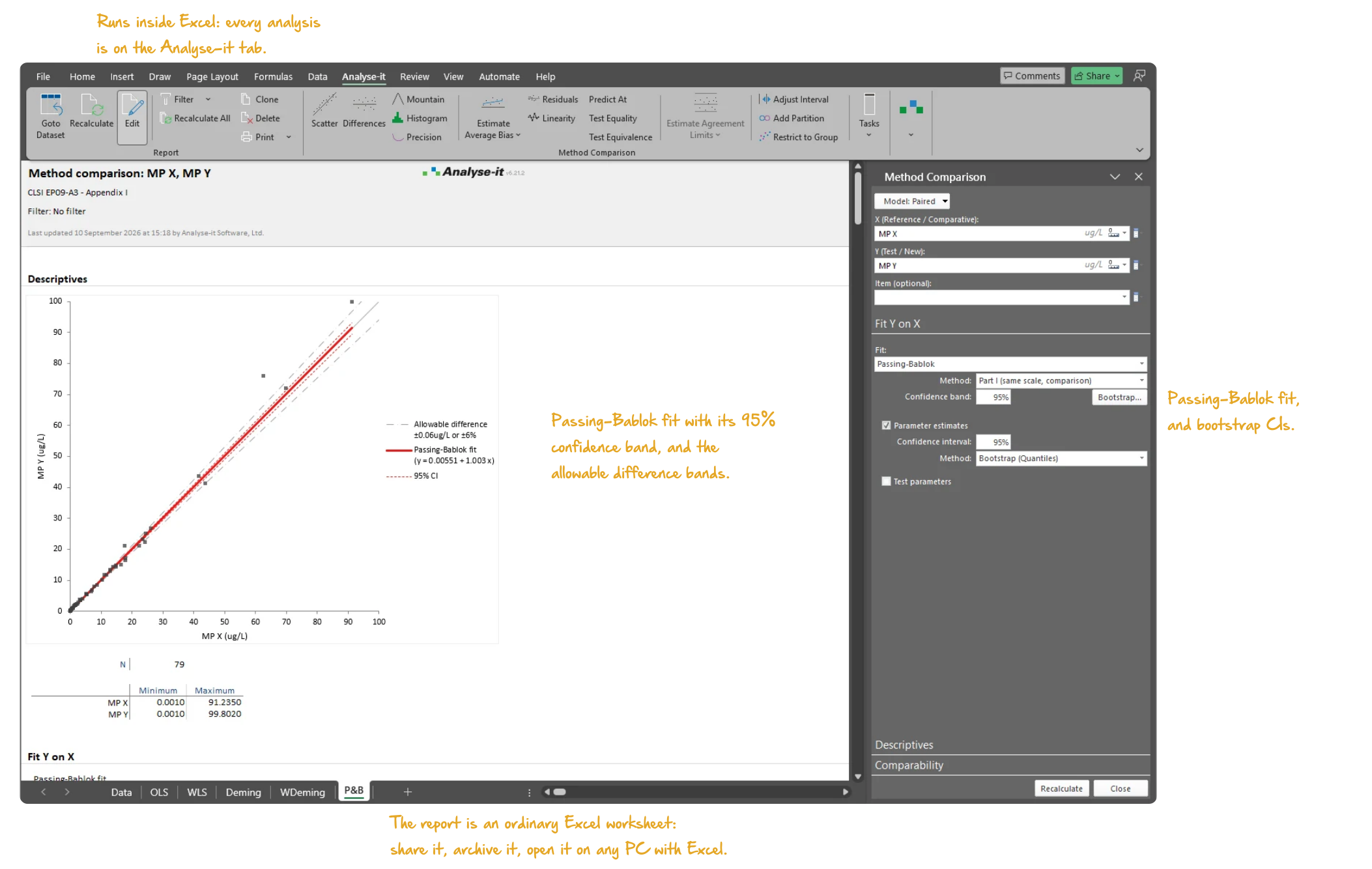
Microsoft Excel with the Analyse-it tab selected, showing the Passing-Bablok regression report for the CLSI EP09-A3 Appendix I data: the scatter plot of MP Y against MP X with the Passing-Bablok fit line, its 95% confidence band, the identity line and the allowable difference bands, then the Fit Y on X table with the equation and the intercept and slope with bootstrap 95% confidence intervals from 999 bootstrap samples, and the Method Comparison task pane open on Fit Y on X with Passing-Bablok as the fit and the bootstrap confidence interval method. Handwritten notes: Runs inside Excel: every analysis is on the Analyse-it tab; Passing-Bablok fit with its 95% confidence band, and the allowable difference bands; Passing-Bablok fit, and bootstrap CIs; The report is an ordinary Excel worksheet: share it, archive it, open it on any PC with Excel.

The non-parametric starting point for method comparison

Analyse-it has a tremendous advantage in its ease of use. With other programs, you really have to study how to use them, but Analyse-it makes it so easy, and at the same time offers the advanced procedures we need like Weighted Deming regression.
Marco Balerna, Ph.D.
Clinical Chemist
Ente Ospedaliero Cantonale, Switzerland
Read the case study →

Excel’s LINEST function and chart trendline fit an ordinary least-squares line and stop. The reference method is assumed error-free, the errors normally distributed, and a single outlier can pull the whole line. Passing-Bablok is often the first regression you run in a method comparison study. The method makes no distributional assumptions, is inherently resistant to outliers and does not need the precision ratio between the methods. But the slope and intercept are only useful if the linear model holds across the measuring range. If it does not, the bias estimate is misleading and any conclusion drawn from it is unreliable.

Does the linear model hold across the whole measuring range, or only part of it? Is the slope different from 1, and the intercept from 0? At the concentrations where clinical decisions are made, is the bias within what is clinically acceptable? And when bias and imprecision are combined, does the method still meet the allowable total error?

Passing-Bablok regression, 1983 and 1988 methods, bootstrap and normal CIs

Passing-Bablok is the regression to run before you know the error structure. The method assumes no error distribution, resists outliers, and does not need the precision ratio between the methods. Both the original 1983 and the extended 1988 methods are available; the 1988 method handles tied slopes more robustly for larger datasets. Slope and intercept come with bootstrap confidence intervals for reliable coverage without distributional assumptions, or normal approximation intervals for comparison with published results. The scatter plot shows the fitted line with its confidence band, the identity line, the allowable error bands and the equation.
  • Original 1983 Passing-Bablok method
  • 1988 Passing-Bablok method
  • Slope and intercept
  • Bootstrap confidence intervals
  • Reproducible bootstrap intervals (fixed seed) new in v5.51
  • Normal approximation confidence intervals
  • Scatter plot with fit line, confidence bands, identity line, and equation
  • Scatter plot with allowable error bands
  • Vary colour of points by a factor
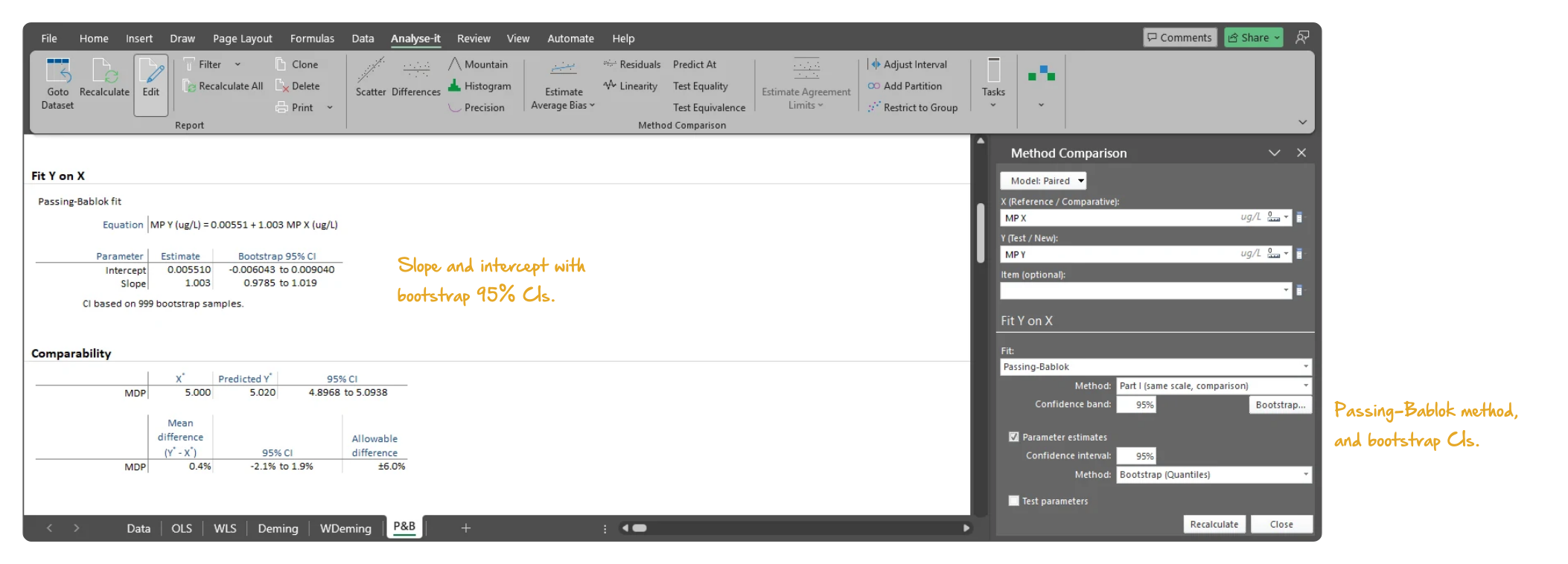
Microsoft Excel showing the Fit Y on X section of a Passing-Bablok regression report on the CLSI EP09-A3 Appendix I data: the equation, the intercept and slope with bootstrap 95% confidence intervals and the note that the intervals are based on 999 bootstrap samples, the Comparability table beneath, and the task pane open on Fit Y on X with Passing-Bablok as the fit and the bootstrap confidence interval method. Handwritten notes: Slope and intercept with bootstrap 95% CIs; Passing-Bablok method, and bootstrap CIs.
The Passing-Bablok fit on the EP09-A3 Appendix I data, 79 samples: y = 0.00551 + 1.003 x, with the intercept and slope each given a bootstrap 95% confidence interval from 999 bootstrap samples.

CUSUM and Kolmogorov-Smirnov linearity tests, residual plots and Pearson r

The slope and intercept are only useful if the linear model holds across the measuring range; if it does not, the bias estimate is misleading. The CUSUM linearity test is built into the same analysis, with an exact p-value rather than a pass/fail, and the CUSUM plot alongside it. The Kolmogorov-Smirnov linearity test is also available. When linearity does not hold, partition the measuring range into intervals or switch to a different approach, rather than force one line across a nonlinear relationship. Residual plots, raw and standardised, with a histogram show the scatter about the line. Pearson r summarises the correlation, and the precision of each method is reported as SD or CV.

  • CUSUM linearity test with exact p-values
  • Kolmogorov-Smirnov linearity test
  • CUSUM linearity plot
  • Residual plot (raw and standardised) with histogram
  • Pearson r correlation coefficient
  • Precision (SD or CV) for each method

Bias at clinical decision points with equality and equivalence tests

The slope gives the average bias across the range; clinical decisions are made at specific concentrations. Predict the mean bias, with a confidence interval, at any decision threshold you specify. Test equality (is there a significant difference?) and equivalence (is the difference within what is clinically acceptable?) at each point per EP09-A3. The allowable difference can be an absolute concentration, a percentage, or a combination — such as “10%, with a minimum of 5 mg/dL.”

  • Predict bias at clinical decision points
  • Equality and equivalence tests at decision points
  • Allowable error: absolute, percentage, or combination
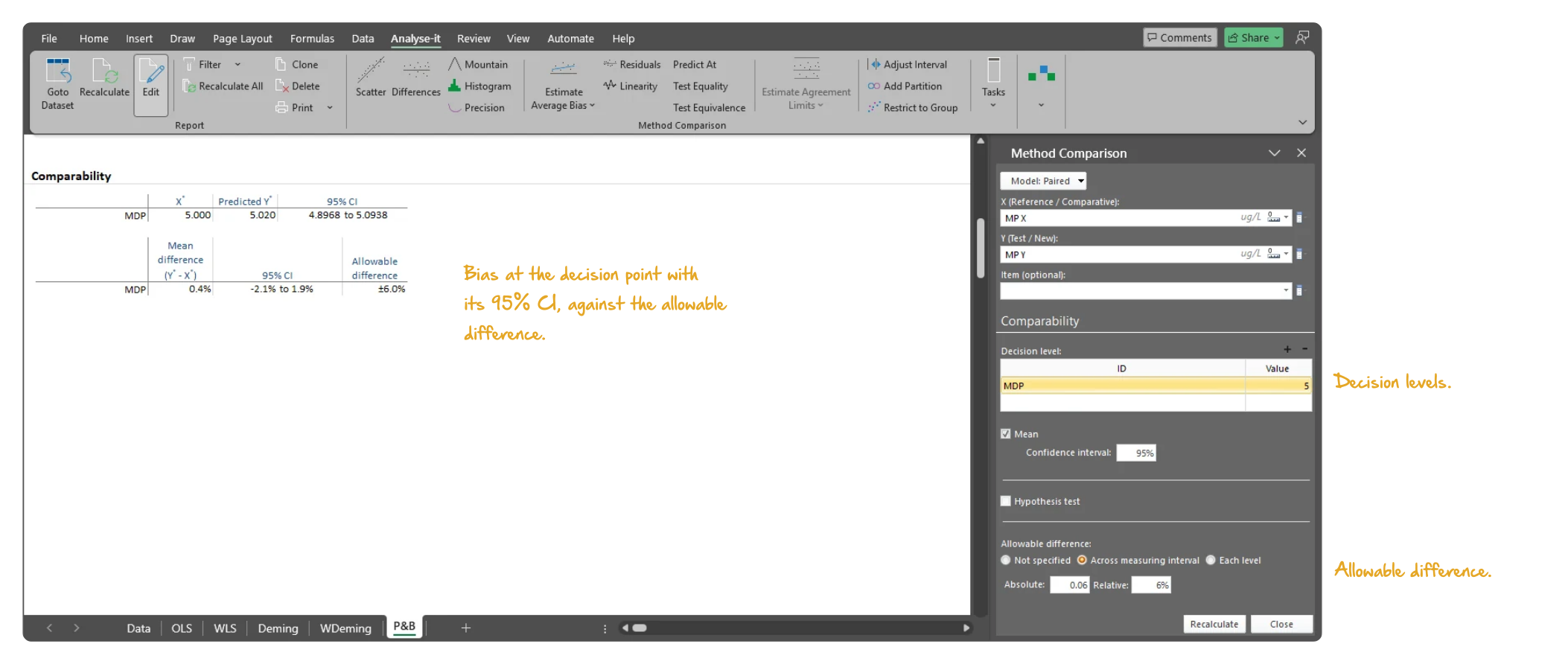
Microsoft Excel showing the Comparability section of a Passing-Bablok regression report on the CLSI EP09-A3 Appendix I data: the bias at the 5 microgram per litre decision point, 0.4%, with its 95% confidence interval of minus 2.1% to 1.9% and the plus or minus 6% allowable difference, and the task pane open on Comparability with the decision level table, the hypothesis test tick box and the allowable difference options. Handwritten notes: Bias at the decision point with its 95% CI, against the allowable difference; Decision levels; Allowable difference.
Passing-Bablok fit: the bias at the 5 μg/L decision point, 0.4% with 95% CI −2.1% to 1.9%, inside the ±6% allowable difference, with the decision level and the allowable difference set in the task pane.

Replicate measurements and partitioned measuring intervals

One regression across the whole range is wrong when precision changes with concentration or the relationship is linear over only part of it. Partition the data into separate measuring intervals, each with its own regression, bias estimates and comparability assessment. Each interval gets its own allowable difference per EP09-A3; or reduce the interval to the range the comparison supports. Use any fit within an interval — Passing-Bablok in one, Bland-Altman or Deming in another. Measure in singlicate, duplicate or any number of replicates: within-subject variation is estimated directly from the replicate structure and the confidence intervals adjusted accordingly, not approximated by averaging.
  • Singlicate, duplicate, and replicate measurements
  • Reduce or partition measuring interval
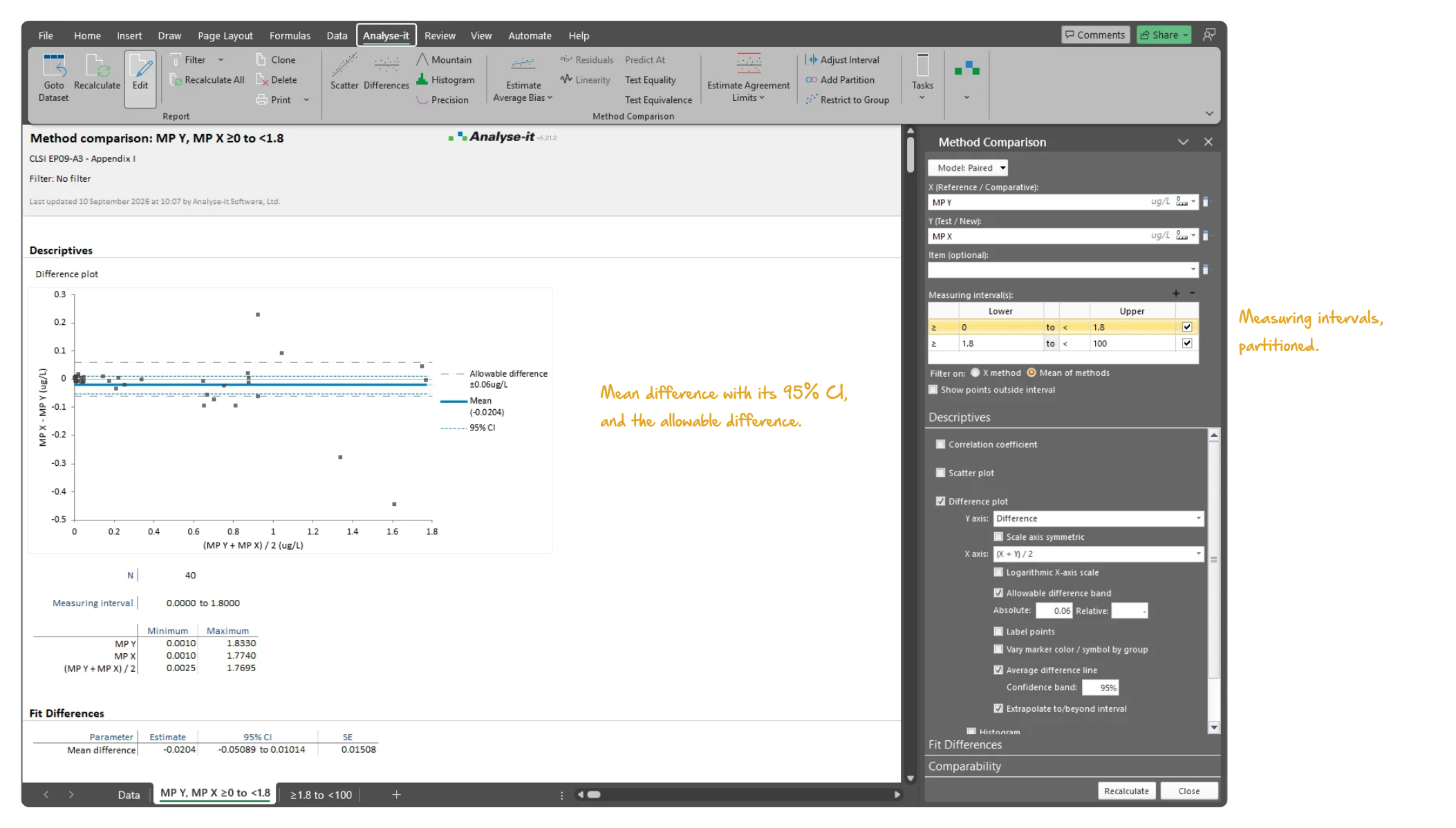
Microsoft Excel showing the method comparison report for the 0 to 1.8 microgram per litre interval of the CLSI EP09-A3 Appendix I data: the difference plot of MP X minus MP Y against the mean of the two methods with the mean difference, its 95% confidence interval and the plus or minus 0.06 allowable difference band, N 40 and the measuring interval beneath, and the task pane listing the two measuring intervals, 0 to 1.8 and 1.8 to 100, with the Fit Differences section open. Handwritten notes: Mean difference with its 95% CI, and the allowable difference; Measuring intervals, partitioned.
The 0 to 1.8 μg/L interval of a partitioned measuring range: 40 of the 79 samples, the mean difference −0.0204 μg/L with its 95% CI and the ±0.06 μg/L allowable difference, with both intervals listed in the task pane.

Total analytical error per EP21-A, difference plot and mountain plot

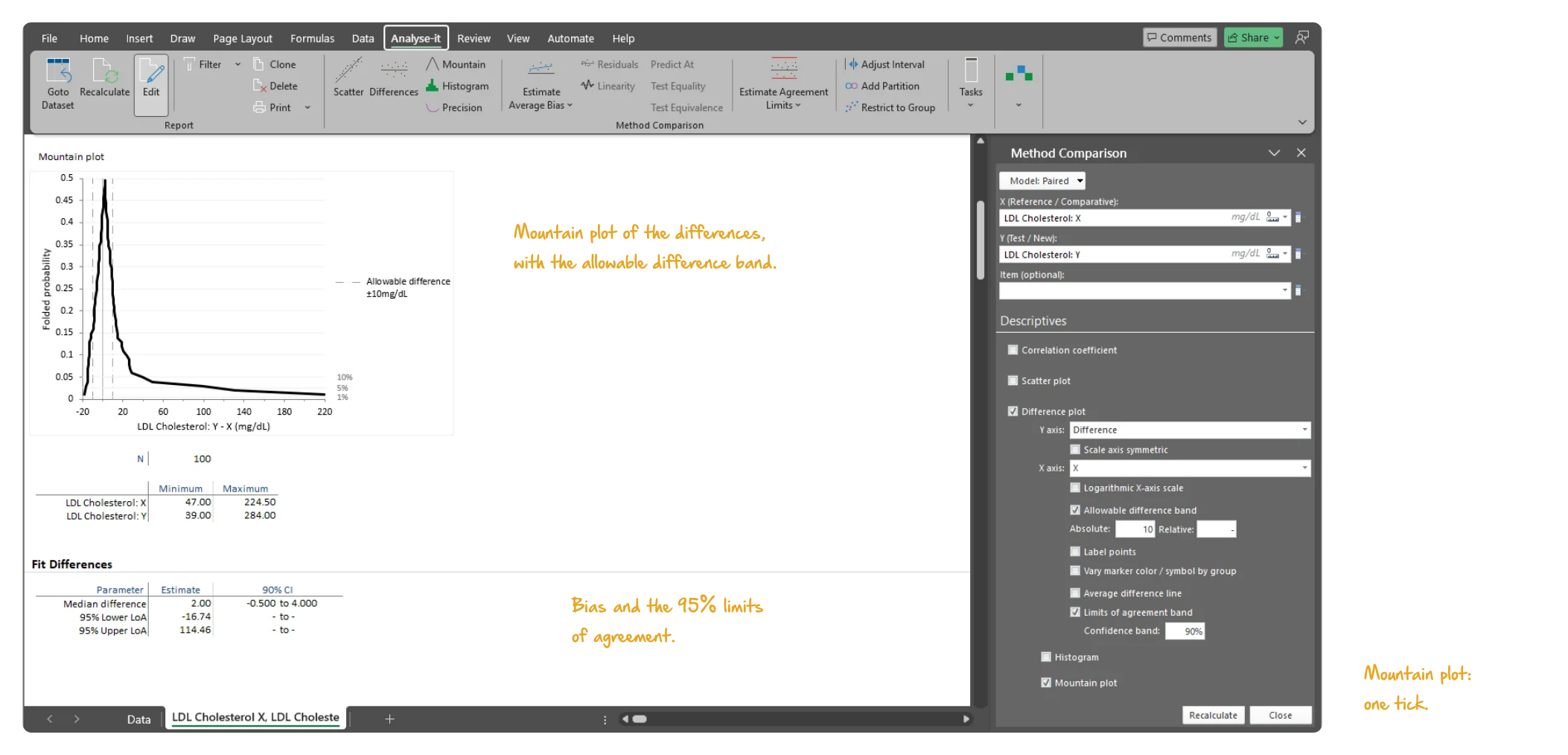
A method can pass on bias and still fail in use, because bias and imprecision act together. Per EP21-A, the bias estimate is combined with the imprecision of the test method and the total compared against the allowable error at each decision point. One pass/fail assessment accounts for both. The difference plot — difference, relative difference or ratio — shows every difference against the allowable difference band, with a histogram alongside. The mountain plot shows the same differences as a folded cumulative distribution against the same band.
  • Total analytical error per EP21-A
  • Difference / relative difference / ratio plot
  • Difference plot with allowable difference band and histogram
  • Linear or log X-axis on difference plots new in v5.51
  • Mountain plot with allowable difference band
Microsoft Excel showing the mountain plot of a method comparison report for LDL cholesterol from CLSI EP21-A Table 2, 100 samples: the folded cumulative distribution of the differences Y minus X with the plus or minus 10 mg/dL allowable difference band, N 100 and the range of each method beneath, and the task pane open on Fit Differences. Handwritten notes: Mountain plot of the differences, with the allowable difference band; Bias and the 95% limits of agreement; Mountain plot: one tick.
LDL cholesterol, 100 samples, from EP21-A Table 2: the mountain plot of the differences Y − X against the ±10 mg/dL allowable difference band.

Example analyses

See Passing-Bablok regression results in detail — scatter plots, bias at decision points, and CUSUM linearity testing — using CLSI example datasets you can download and follow along with.
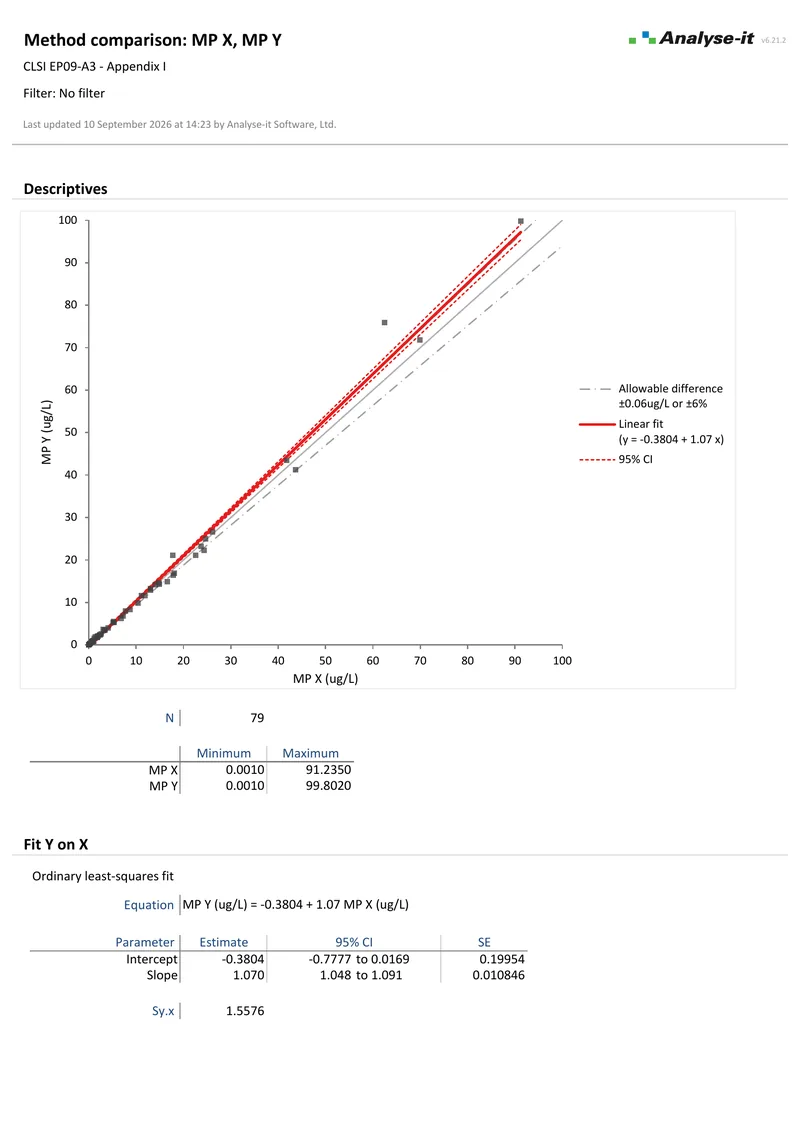
EP09 A3 Example 2 10 pages EP09-A3 — Appendix I
All five regression fits.
79 observations. Passing-Bablok alongside OLS, Weighted OLS, Deming, and Weighted Deming. Bias at decision point 5 μg/L with CI and equality test.
EP09 A3 Example 1 2 pages EP09-A3 — Appendix I
Difference plots over a partitioned interval.
Measuring range partitioned into 0 to 1.8 μg/L and 1.8 to 100 μg/L with different allowable differences per interval.
EP21 A Example 1 2 pages EP21-A — Table 2
LDL cholesterol total analytical error.
100 observations. Mountain plot, limits of agreement, and allowable difference ±10 mg/dL.

Part of the method comparison workflow

Passing-Bablok is one of five regression methods in the method comparison analysis. For a parametric approach, see Deming and Weighted Deming regression. To see the distribution of differences and limits of agreement, see Bland-Altman.

Related guides in our Learn section: choosing a regression for method comparison and why correlation is the wrong statistic.

Software you can trust

Validated calculations you can defend at inspection Every calculation is performed by Analyse-it — no Excel formulas, no third-party functions. Results are validated against CLSI reference datasets, published datasets, and thousands of internal test cases before every release. See how we develop and validate Analyse-it →
Data stays in your facility Analyse-it runs entirely within Microsoft Excel on your PC. No cloud processing, no data transmission. Pre-submission data, patient-adjacent data, and in-process results stay within your facility under your own data governance controls.
Standard Excel workbooks anyone can open Every analysis is an ordinary .xlsx workbook. Share with colleagues, submit to regulatory affairs, archive for audit, open on any PC with Excel. No proprietary format, no licence required to view results. Colleagues and auditors see exactly what you see.
Results that cannot be accidentally broken Analysis output contains computed values, not formulas. Nothing to accidentally overwrite, no cell references to break, no formula errors to introduce. The results you reported are exactly what you will find when you reopen the workbook months or years later for an audit.

Free trial and pricing

Try it on your own data first. The 15-day trial is every feature from all five editions, with no sign-up and no licence key — install it and start straight away.

Method Validation edition from US$ 475 per year, or US$ 1155 for a perpetual licence. Every purchase carries a 30-day money-back guarantee. Need a quote for purchasing? Add the licence to the cart and save it as a PDF quote.