Analyse-it
Analyse-it
  • Products
  • Pricing
  • Support
  • About us
Download trial Sign in
  • User's Guide
  • Feedback and crash reports

Submitting crash reports

Submit a crash report whenever you experience a problem so that we can try to solve it.

If Analyse-it crashes or experiences a problem, it creates a crash report and prompts you to send it to us for investigation. Crash reports include technical information (application state, hardware configuration, and stack traces) to help us diagnose and fix the problem. Before Analyse-it submits the crash report it checks if a fix is available. If so, Analyse-it gives you details on how to fix the problem. If no fix is available, you should submit the crash report to help us improve the application. Even if you experience a crash that seems similar to previous crashes you should still submit it as each report often provides new insight or perspective on a crash.
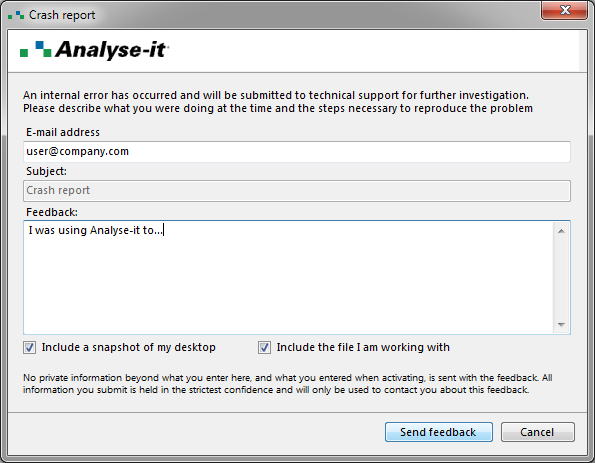
  1. If Analyse-it detects a serious problem, the Crash Report window opens.

    send crash report

  2. Enter an E-mail address where we can contact you.

    We respect your privacy at all times. We do not collect any personal information, and we only use your e-mail address if we need to contact you about the crash report.

  3. Enter Feedback to describe what you were doing when the crash occurred and, if possible, the steps to reproduce the problem.
  4. Select Include a snapshot of my desktop if it helps to show the problem.
  5. Select Include the file I am working with to include the active Excel workbook if it contains data that helps to show the problem.

    We treat any data received as private and confidential. It is used only for the purpose you submit it, and we delete it when no longer needed.

  6. Click Send.

    Your crash report is sent using your internet connection.

After submitting the crash report, Analyse-it attempts to recover so you can save your work and continue using the software. If the crash was serious and causes repeated subsequent crashes, you should restart Microsoft Excel and Analyse-it.
Related concepts
Feedback and crash reports

  •  What is Analyse-it?
  •  What's new?
  •  Administrator's Guide
  •  User's Guide
  •  Getting to know Analyse-it
  •  Preparing data for analysis
  •  Working with analyses
  •  Feedback and crash reports
  •  Sending feedback
  •  Submitting crash reports
  •  Statistical Reference Guide


Version 6.15
Published 18-Apr-2023
Products
  • Standard Edition
  • Medical Edition
  • Quality Control & Improvement Edition
  • Method Validation Edition
  • Ultimate Edition
  • Compare Editions
  • Pricing
Support
  • Documentation
  • Tutorials
  • Download latest version
  • Release history
  • Contact support
Company
  • About us
  • Blog
  • Contact us
  • Privacy policy

Get Started

  • Download free trial
  • Sign In

© 2026 Analyse-it® Software, Ltd. All rights reserved.

Statistical analysis and method validation software for Microsoft Excel.

We use essential cookies to run the site, and optional analytics to improve the experience for visitors. For more information see our Privacy policy.