
Determining process capability
To determine process capability it is important that the process is in statistical control. It is meaningless to characterize a process that is unpredictable.
The 6-up capability analysis shows the process control charts, a histogram of the distribution, a box-plot summary of the distribution, a mean +/- 3 sigma plot, and normal probability plot. Upper and lower specification limits show the specification.
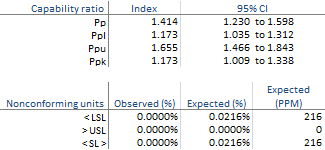
Based on the report you can see:
- The process is in statistical control during the period.
- The distribution is approximately Normal which is an assumption of most capability indices.
- Ppk is 1.173 indicating the process is not capable meeting the specifications.
- Pp is 1.414 indicating that if the process were centered between the specification limits it would just be acceptable.
- It is expected the process will produce 216 non-conforming units per million.
Next topic: What's the difference between Pp and Cp?