Measurement system analysis software for method validation Precision, trueness, linearity, and detection capability — five CLSI protocols in one analysis for characterising measurement system performance.

Every feature from all five editions for 15 days, no sign-up.
Method Validation edition from US$ 475 a year · 30-day money-back guarantee.
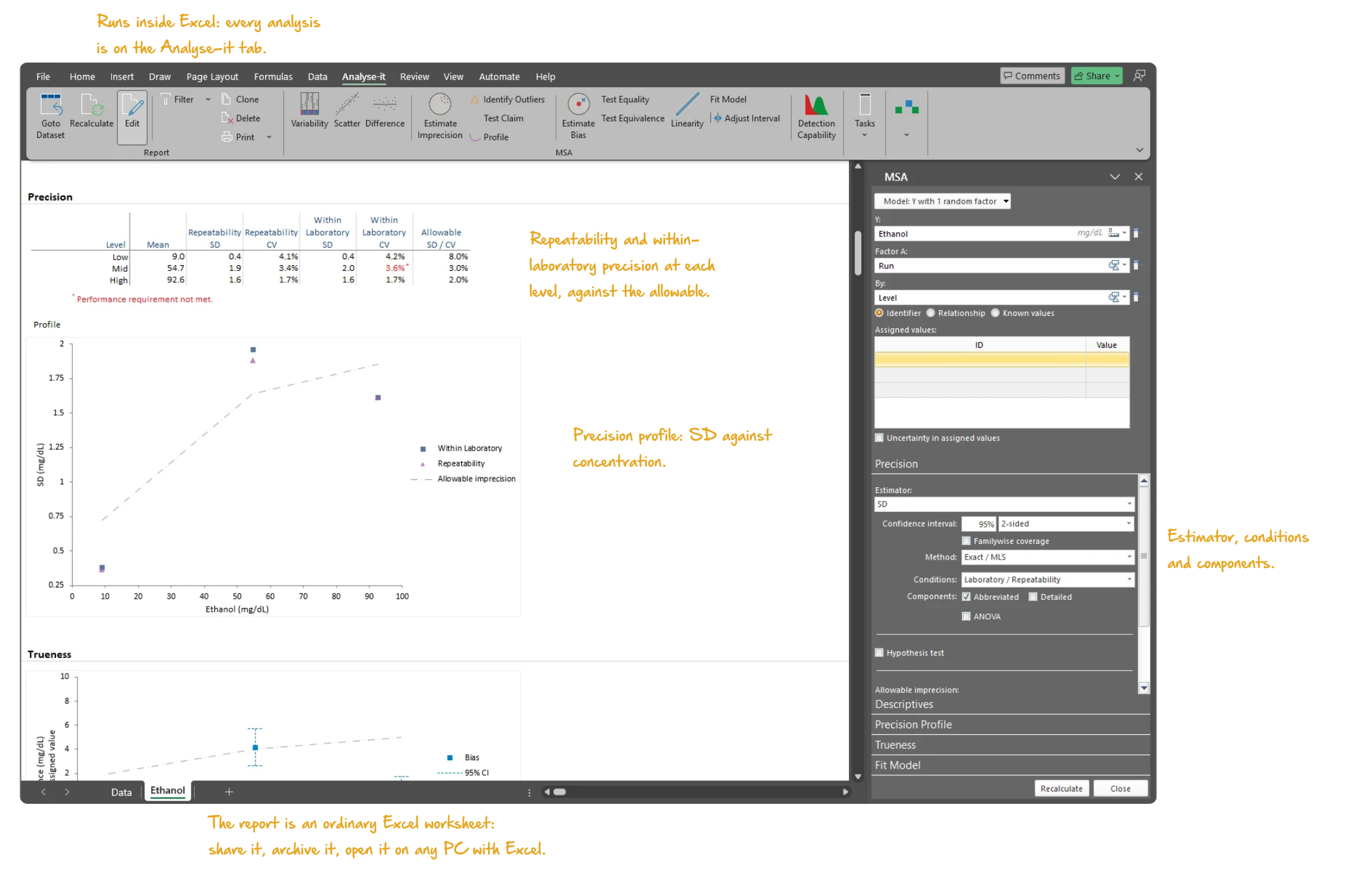
Microsoft Excel with the Analyse-it tab selected, showing the Precision section of a measurement system analysis report for the CLSI EP10-A3-AMD Appendix B ethanol data: the precision table with the CV at each of the three levels, its 95% confidence interval and the allowable imprecision, the abbreviated repeatability and within-laboratory components, the precision profile plot of SD against concentration, and the task pane open. Handwritten notes: Runs inside Excel: every analysis is on the Analyse-it tab; Repeatability and within- laboratory precision at each level, against the allowable; Precision profile: SD against concentration; Estimator, conditions and components; The report is an ordinary Excel worksheet: share it, archive it, open it on any PC with Excel.

Characterise the full performance of a measurement procedure in one analysis

I used Analyse-it for many product development, product troubleshooting, and technology evaluation activities... your product was the easiest to use, was accurate, and produced publication ready reports.
Stanley F. Cernosek, Ph.D.
Clinical Chemistry Reagent Development
Beckman Coulter, Inc.

Excel’s AVERAGE and STDEV functions give one mean and one standard deviation and stop. No variance components, no confidence interval on a CV, no test against a claim, no allowable-error bands. Before clinical use a measurement procedure needs four things established: precision, trueness, linearity across the reportable range and the lowest concentration it can detect. Each characteristic has its own CLSI protocol, its own experimental design and its own acceptance criteria. Doing the work in separate tools means re-entering data and reconciling formats at every handoff, a risk when the results feed a 510(k) submission or an accreditation file.

Is the imprecision within the claim, and which component drives it? Is the bias within the allowable bias at every level, or only on average? Where does the assay stop being linear, and what is the reportable range? Where do LoB, LoD and LoQ fall? Analyse-it runs all five protocols in one analysis, on one experiment design with nested factors. The precision profile feeds straight into LoB, LoD and LoQ, with no re-entering of data.

Variance components, precision profiles and nested designs per EP05-A3

A single SD hides where the imprecision comes from. Variance component analysis per EP05-A3 separates repeatability from the between-run, between-day, between-operator and between-site contributions, with exact, Satterthwaite or MLS confidence intervals. Designs are flexible: up to three random nested factors and one fixed factor in any arrangement, balanced or unbalanced. Run 3 sites × 5 days × 2 runs × 3 replicates, or a single-laboratory 20 × 2 × 2 verification. A precision profile shows how imprecision changes across the measuring range, with seven variance function models that feed directly into detection capability estimation. Generalised ESD outlier identification and a variability of measurements plot check the data first.

  • Up to 3 random nested factors
  • 1 fixed factor (e.g. level)
  • Balanced and unbalanced designs
  • Precision as variance, SD, or CV%
  • Exact, Satterthwaite, and MLS confidence intervals
  • Abbreviated reproducibility/repeatability and detailed intermediate precision components
  • ANOVA table
  • Terminology: total/within, reproducibility/repeatability, or laboratory/repeatability
  • Variability of measurements plot
  • Generalised ESD outlier identification
  • SD or CV across the measuring range
  • Constant variance function
  • Constant CV function
  • Mixed constant/proportional variance function
  • 2-parameter (linear) variance function
  • Sadler 3-parameter power function
  • 3-parameter alternative power function
  • 4-parameter function with turning point
  • Precision profile with variance function fit
  • Predict the SD or CV at any concentration from the variance function new in v5.51

Precision verification: χ² test against the precision claim per EP15-A3

Verification is a pass/fail question: is the imprecision within the manufacturer’s claim? The EP15-A3 design, 5 runs × 5 observations on each sample, gives within-run and total precision for each sample. A χ² test compares each against the claimed SD or CV and reports the p-value, so the verdict rests on a test rather than a comparison by eye.

  • χ² test against precision claim
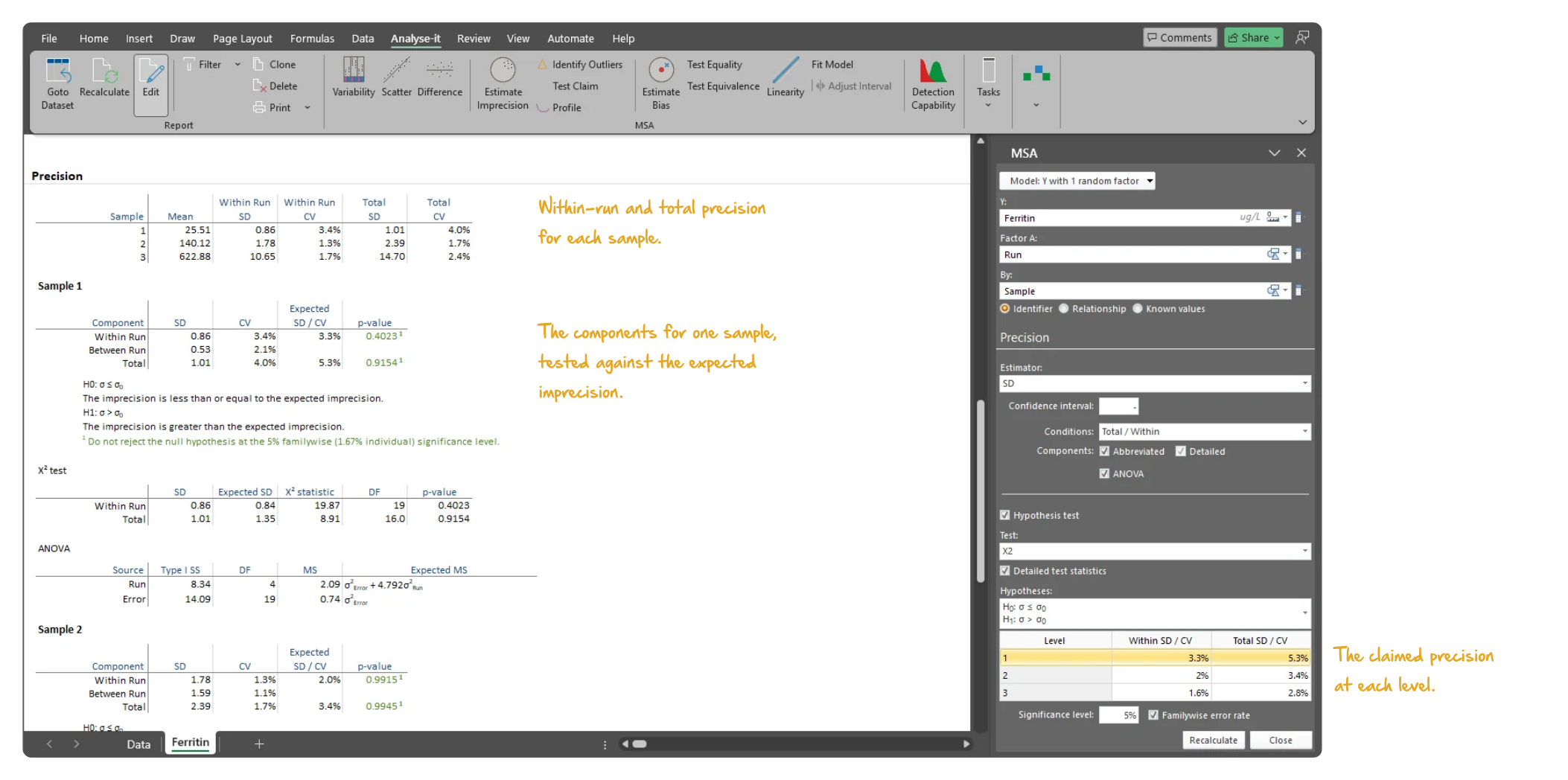
Microsoft Excel showing the Precision section of a measurement system analysis report for the CLSI EP15-A3 Table 8 ferritin data: the within-run and total SD and CV for each of three samples, then for the first sample the components against the expected imprecision with p-values, the hypotheses, the chi-squared test table and the ANOVA table, with the task pane open. Handwritten notes: Within-run and total precision for each sample; The components for one sample, tested against the expected imprecision; The claimed precision at each level.
Ferritin from EP15-A3 Table 8, 3 samples × 5 runs × 5 observations: within-run and total precision for each sample, then the components for the first sample tested against the manufacturer’s claimed imprecision with the χ² test.

Bias estimation: equality and equivalence tests against allowable bias

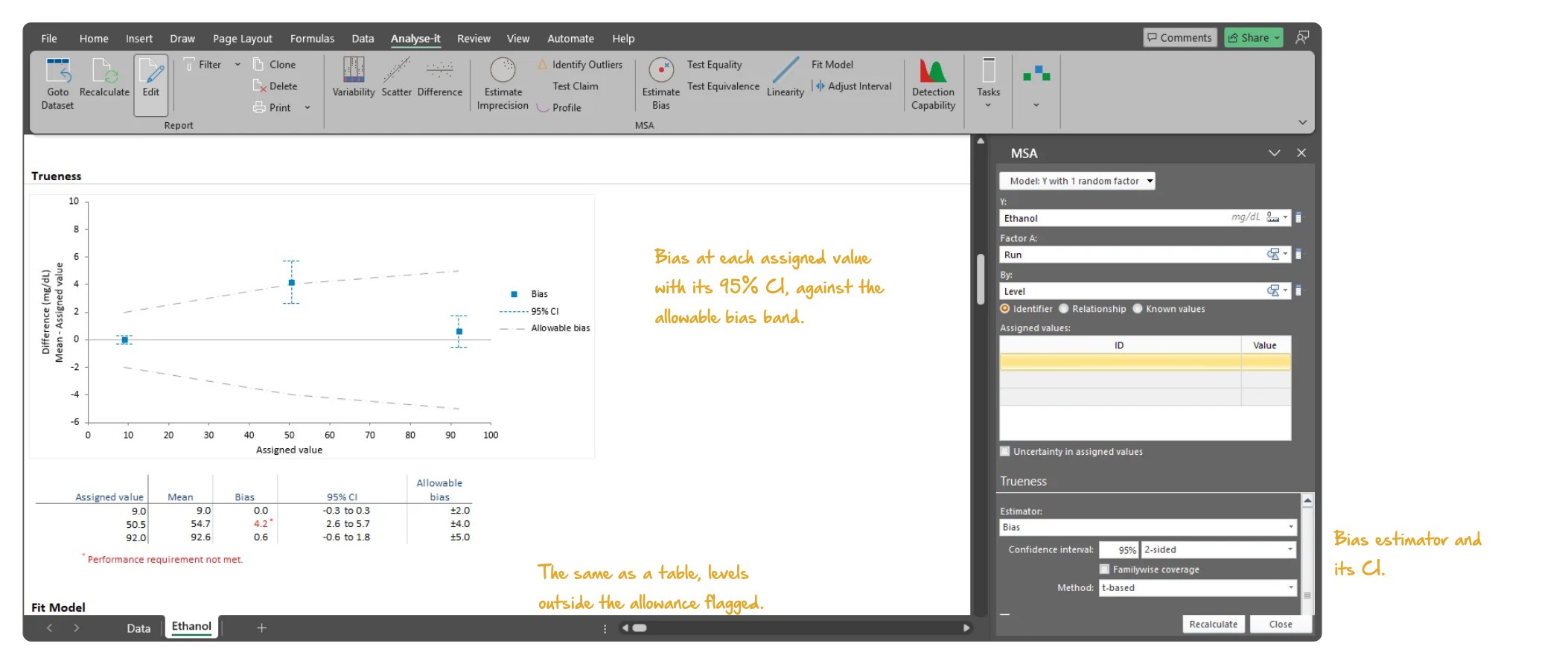
A bias estimate on its own does not say whether the bias matters. Bias against each assigned value is reported with its confidence interval and tested two ways. Equality asks whether there is any bias; equivalence asks whether the bias is within the allowable bias — such as “within ±2 mg/dL of the assigned value”. The difference plot shows the bias at each level against the allowable bias bands, so a level that fails is visible at once.
  • Bias with confidence interval
  • Difference plot of bias against assigned values with allowable bias bands
  • Test equality (no bias) or equivalence (bias within allowable bias)
Microsoft Excel showing the Trueness section of a measurement system analysis report for the CLSI EP10-A3-AMD Appendix B ethanol data: the difference plot of the mean minus the assigned value at the three levels with 95% confidence intervals and the allowable bias band, and the bias table beneath with the 95% CI and allowable bias for each level, with the task pane open. Handwritten notes: Bias at each assigned value with its 95% CI, against the allowable bias band; The same as a table, levels outside the allowance flagged; Bias estimator and its CI.
Ethanol from EP10-A3-AMD Appendix B: the bias at each of the three assigned values with its 95% CI against the allowable bias, in the difference plot and in the table beneath it.

Preliminary evaluation per EP10-A3-AMD: precision and bias at each level

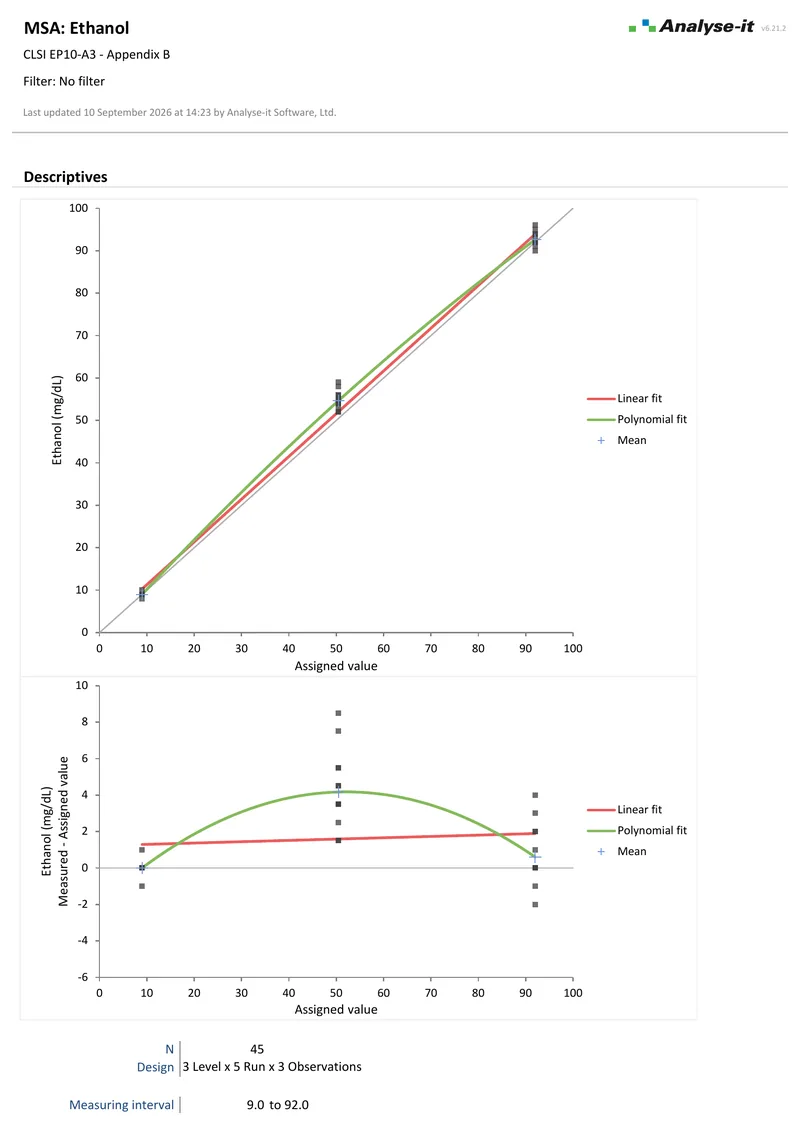
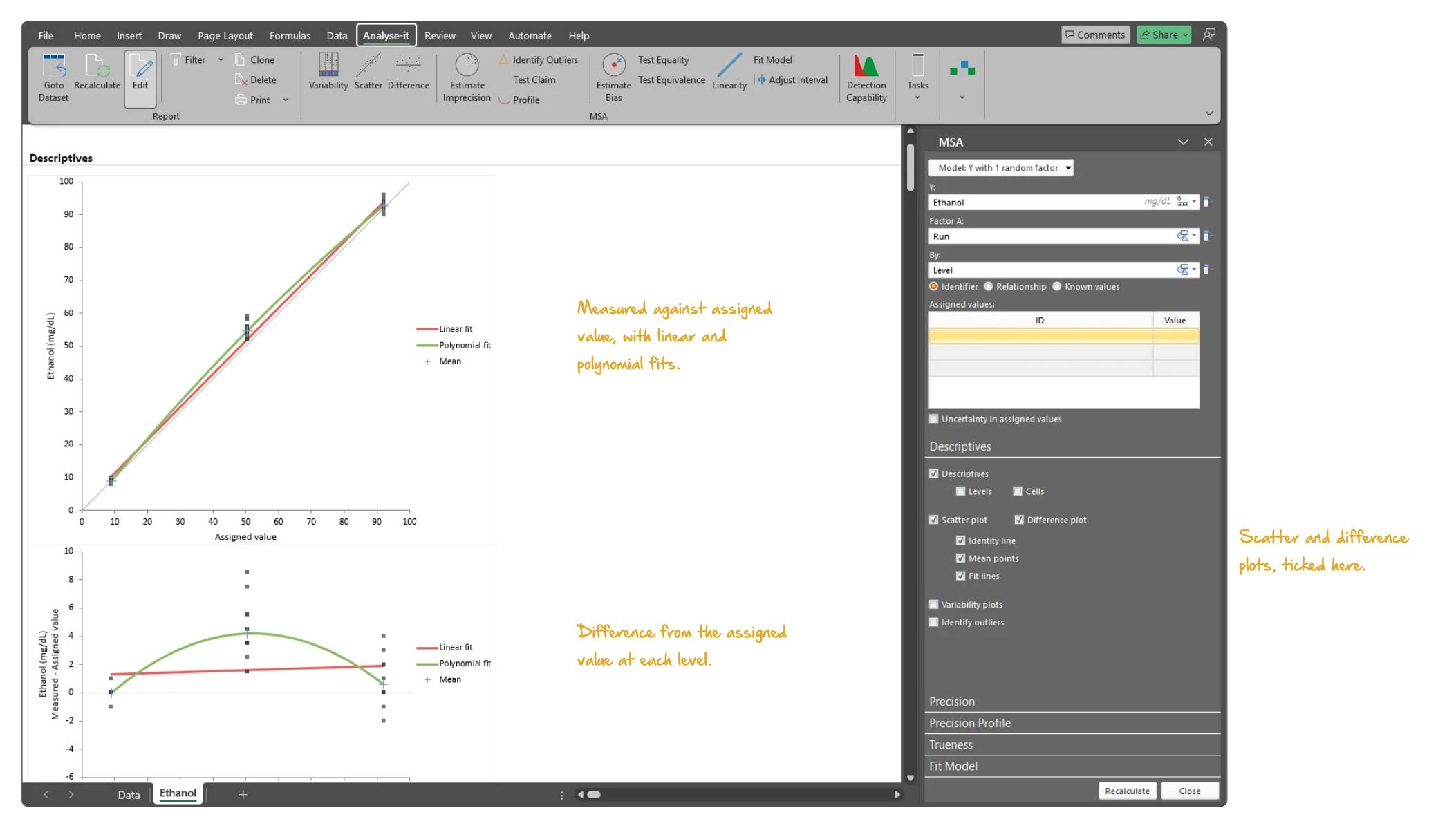
EP10-A3-AMD is the quick check before the full studies: three levels, five runs, three observations. Precision at each level is reported with its confidence interval against the allowable imprecision, and bias at each assigned value against the allowable bias. Any level that fails is flagged. Scatter and difference plots show the measured values against the assigned values with linear and polynomial fits.
  • Scatter plot and difference plots
Microsoft Excel showing the Descriptives section of a measurement system analysis report for the CLSI EP10-A3-AMD Appendix B ethanol data: the scatter plot of the measured values against the assigned values at the low, mid and high levels with the linear fit, polynomial fit and level means, and the difference plot of measured minus assigned value beneath, with the task pane open. Handwritten notes: Measured against assigned value, with linear and polynomial fits; Difference from the assigned value at each level; Scatter and difference plots, ticked here.
Ethanol at three levels, 5 runs × 3 observations: the measured values against the assigned values with linear and polynomial fits and the level means, and the differences from the assigned values beneath.

Linearity per EP06-Ed2: polynomial fits and Hsieh-Liu confidence intervals

Linearity is a question of how far the assay departs from a straight line, and whether that departure is acceptable. Linear and polynomial fits — 2nd to 5th order, forward stepwise, or the best 2nd or 3rd order — show where the assay is linear. Adjust the measuring interval to find the reportable range. The difference between the linear and the nonlinear fit, with Hsieh-Liu confidence intervals, is tested for equality and equivalence against the allowable nonlinearity, such as ±5%. Weighted models handle non-constant precision.

  • Linear, polynomial (2nd to 5th order), forward stepwise, and best (2nd or 3rd) polynomial regression
  • Weighted fits: by the variance at each level, the pooled variance, or a variance function
  • Adjustable measuring interval to find linear range
  • Assigned values: known, or relative by mixture, addition, or dilution series
  • Difference between linear and nonlinear fit with Hsieh-Liu confidence intervals
  • Equality and equivalence tests against allowable nonlinearity
  • Emancipator-Kroll linearity
  • Linearity plot with linear and polynomial fits
  • Difference plot with allowable nonlinearity band

Detection capability per EP17-A2: LoB, LoD and LoQ, parametric to probit

The lowest concentration a procedure can reliably detect, and the lowest it can quantify, need separate estimates. Limit of blank comes from the blank samples, parametric or non-parametric. Limit of detection comes from the pooled SD of the low-level samples, or from probit regression of the detection rate against concentration. Limit of quantitation comes from the precision profile variance function. The precision profile from the EP05-A3 study feeds straight in, with no re-entering of data.

  • Limit of blank (LoB): parametric (SD) or non-parametric (quantile), or from precision profile variance function
  • Limit of detection (LoD): pooled SD of non-blank materials, or from precision profile variance function
  • Limit of detection (LoD) using probit regression
  • Limit of quantitation (LoQ) from precision profile variance function
  • Frequency density histogram with LoB and LoD
  • Probit regression curve
  • Multiple inverse predictions with confidence intervals new in v5.65

Example analyses

See measurement system analysis results in detail — precision, trueness, linearity, and detection capability — using CLSI example datasets you can download and follow along with.

EP05 A3 Example 1 EP05-A2 — Appendix B
Glucose precision, single site.
20 days × 2 runs × 2 observations, 80 results. Variability plot, repeatability, between-run, within-day, between-day and within-laboratory components, and the ANOVA table.
EP15 A3 Example 1 EP15-A3 — Table 8
Ferritin precision verification.
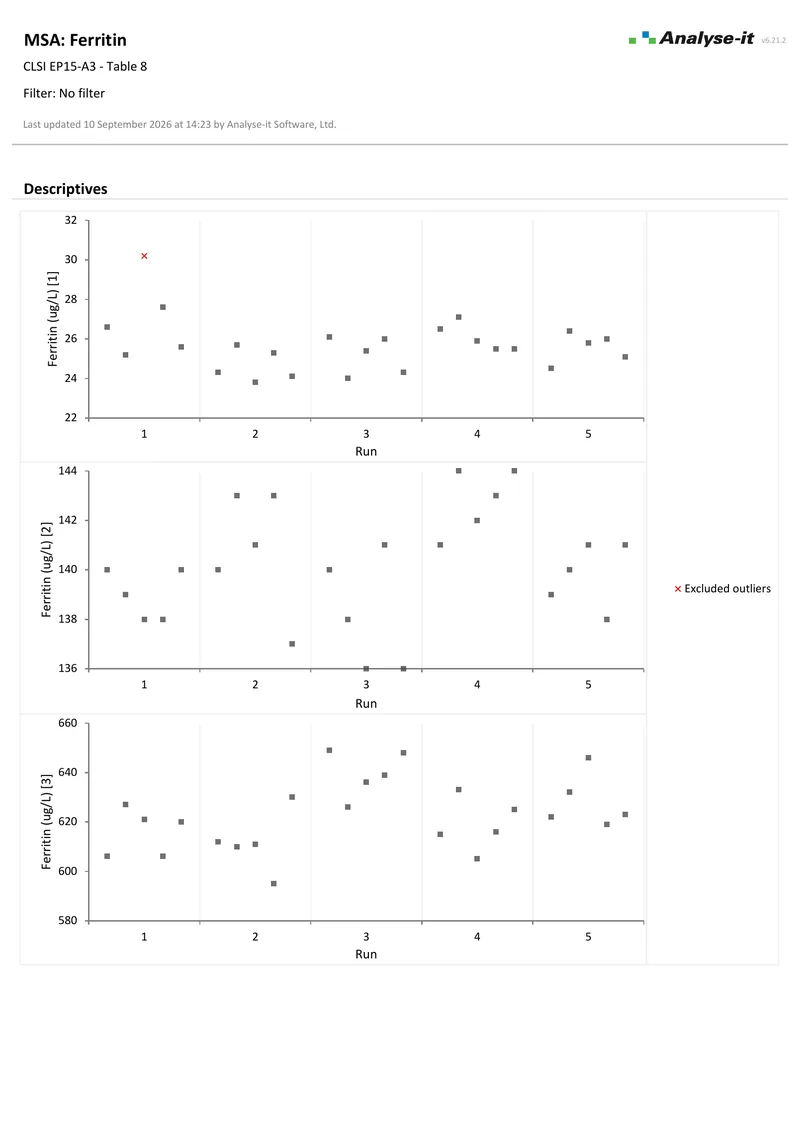
3 samples × 5 runs × 5 observations. Outlier identification with the flagged results excluded, variability plot, within-run and total precision, and a χ² test of each against the manufacturer’s claim.
EP06 A Example 1 EP06-A — Appendix C
IgM linearity.
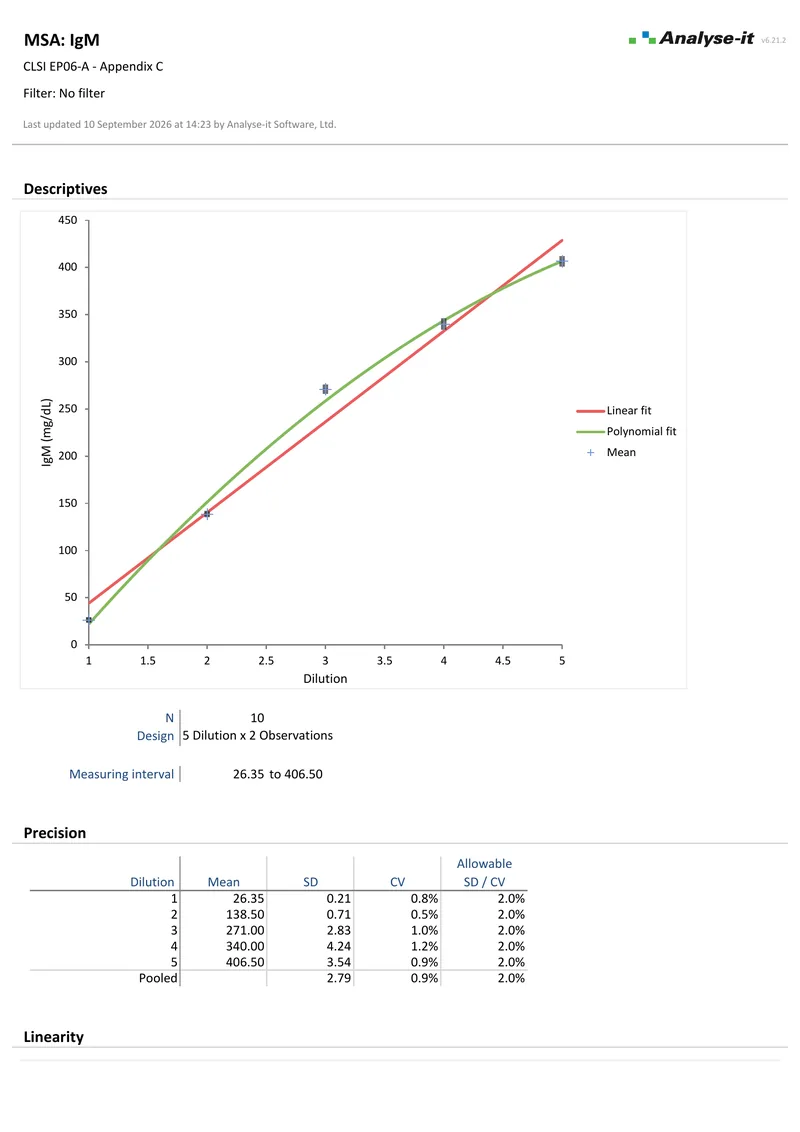
5 dilutions × 2 observations. Linear, second and third order polynomial fits, nonlinearity against a ±5% allowable band, and a difference plot.
EP17 A2 Example 1 EP17-A2 — Appendix A
Estradiol detection capability, two reagents.
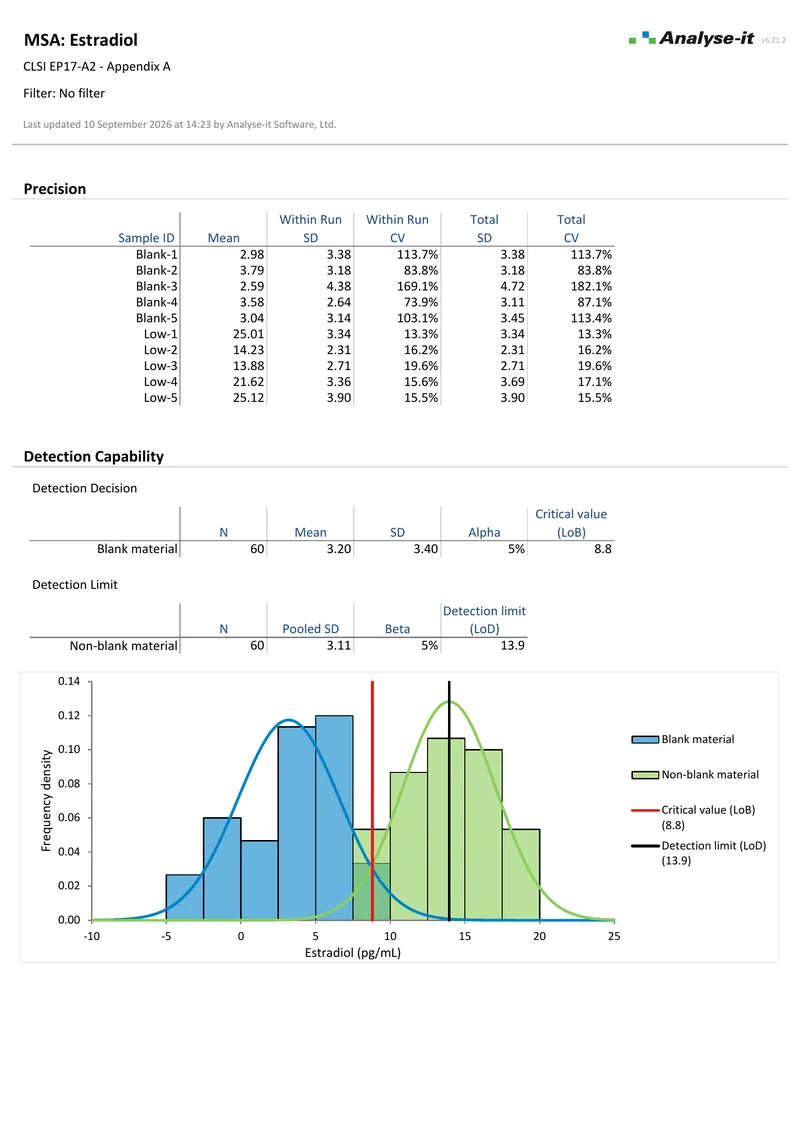
Limit of blank and limit of detection for two reagents, with a bi-histogram of blank against low-level material.
EP10 A3 Example 1 EP10-A3 — Appendix B
Ethanol preliminary evaluation.
3 levels × 5 runs × 3 observations. Precision at each level against an allowable goal — the mid level fails — and bias at each assigned value on a difference plot with allowable bias bands.

Part of the Method Validation Edition

Measurement system analysis is one part of the Method Validation Edition, alongside method comparison, reference intervals, and diagnostic performance.

Related guides in our Learn section: establishing precision, LoB, LoD and LoQ, assessing linearity, interference and recovery testing, rapid method evaluation (EP10), and CAP accreditation and AMR verification.

Software you can trust

Validated calculations you can defend at inspection Every calculation is performed by Analyse-it — no Excel formulas, no third-party functions. Results are validated against CLSI reference datasets, published datasets, and thousands of internal test cases before every release. See how we develop and validate Analyse-it →
Data stays in your facility Analyse-it runs entirely within Microsoft Excel on your PC. No cloud processing, no data transmission. Pre-submission data, patient-adjacent data, and in-process results stay within your facility under your own data governance controls.
Standard Excel workbooks anyone can open Every analysis is an ordinary .xlsx workbook. Share with colleagues, submit to regulatory affairs, archive for audit, open on any PC with Excel. No proprietary format, no licence required to view results. Colleagues and auditors see exactly what you see.
Results that cannot be accidentally broken Analysis output contains computed values, not formulas. Nothing to accidentally overwrite, no cell references to break, no formula errors to introduce. The results you reported are exactly what you will find when you reopen the workbook months or years later for an audit.

Free trial and pricing

Try it on your own data first. The 15-day trial is every feature from all five editions, with no sign-up and no licence key — install it and start straight away.

Method Validation edition from US$ 475 per year, or US$ 1155 for a perpetual licence. Every purchase carries a 30-day money-back guarantee. Need a quote for purchasing? Add the licence to the cart and save it as a PDF quote.