Cross tabulation of the data
When two variables are measured the relationship between them is often of interest. A contingency table describes the joint distribution of the variables. It can also describe the marginal distributions of each variable, or the conditional distribution of one variable given the other.

- Open the file tutorials\Hair-Eye Color.xlsx.
- Click a cell in the dataset.
-
On the Analyse-it ribbon tab, in the
Statistical Analyses group, click
Compare Groups, and then click Contingency
Table.
The analysis task pane opens.
- In the Y (response) variable drop-down list, select Hair.
- In the X (factor) variable drop-down list, Select Eye.
- In the Model: Y by X drop-down list, select Frequency
- In the Frequency variable drop-down list, select Count.
-
On the Analyse-it ribbon tab, in the
Compare Groups group, click Test Proportion > Pearson X2.
A Pearson X2 hypothesis test is added to the analysis task pane.
- In the Hypothesis drop-down list, select The variables are not independent as the alternative hypothesis .
- In the Significance level edit box, enter 5%.
-
Click Calculate.
The results are calculated and the analysis report opens.
The contingency table shows the joint distribution of the variables.

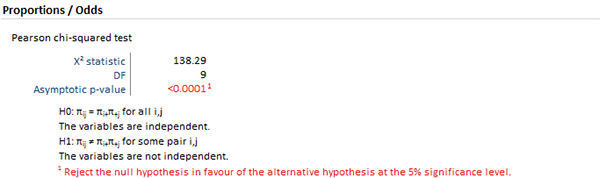
The hypothesis test p-value is highlighted as it is less than 5% significance level (the actual p-value is < 0.0001). You can interpret the p-value as indicating a substantial departure from independence.
Next topic: Displaying patterns of association