
1. Tutorials
  2. Evaluating the linearity of a measurement procedure (CLSI EP06-A)

Evaluating the linearity of a measurement procedure (CLSI EP06-A)

Learn how to characterize the linearity of a measurement procedure for product performance characteristics, for FDA 510k submissions and product marketing.

In this tutorial you will use the CLSI EP06-A procedure to establish the linearity.

Estimating linearity

Estimate the linearity of the measurement procedure.

  1. Open the file tutorials\EP06-A Appendix C.xlsx.

    The worksheet opens showing 3 columns. The Dilution column identifies the levels of the analyte in the sample (5 levels). Calcium identifies the measured value for 2 replicates of sample.

  2. Click a cell in the dataset.
  3. On the Analyse-it ribbon tab, in the Statistical Analyses group, click Linearity.
    The analysis task pane opens.
  4. In the Y drop-down list, select Calcium.
  5. In the By drop-down list, select Dilution.
  6. Select Relative values to indicate that the By variable indicates relative concentrations made from a dilution scheme of high and low samples.
  7. On the Linearity panel, in the Allowable nonlinearity group, select Across measuring interval, and then in the Absolute edit box, enter 0.2.
  8. On the Analyse-it ribbon tab, in the MSA group, click Estimate Imprecision.
  9. Click Calculate.

    The analysis report opens.

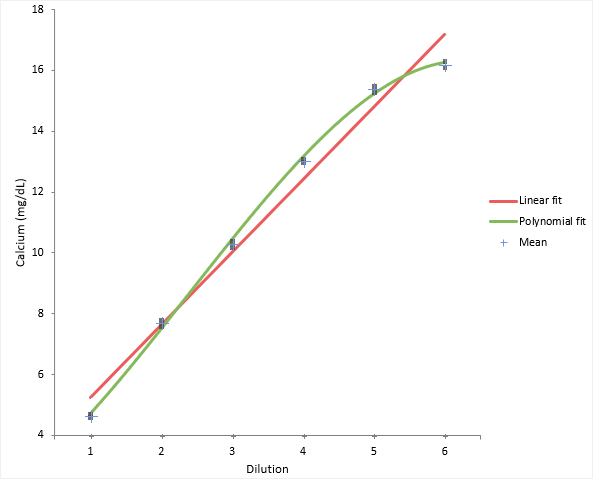
The scatter plot shows a simple visual assessment of the linearity of the measurement procedure over the measuring interval. The red line shows the linear fit, and the green line shows the best non-linear (2nd or 3rd order polynomial) fit.

scatter plot

You should observe the scatter of the points to ensure there are no obvious problems. No individual points stand out as atypical of the bulk of the data. The precision table shows the precision to be constant across the measuring interval at an average 0.12mg/dL which is typical of that expected for the measurement procedure.

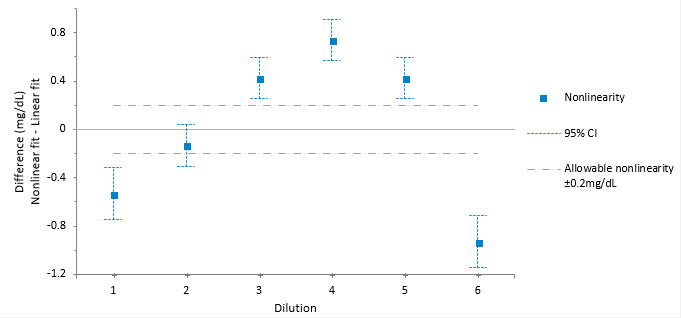
The linearity plot shows the difference between the linear and nonlinear fit across the measuring interval. Five out of the six points are outside the criteria for allowable nonlinear error.

EP06 linearity plot showing non-linearity

Reducing the measuring interval

Reduce the measuring interval to find the interval where the fit is linear.

Sometimes it is possible to reduce the measuring interval to a smaller range that is still useful.

  1. On the Analyse-it ribbon tab, in the Statistical Analyses group, click Adjust Interval.

    The measuring interval drop-down lists show.

  2. In the Measuring interval drop-down lists, select ≥ 1 and ≤ 5.
  3. Click Recalculate.

    The analysis report updates.

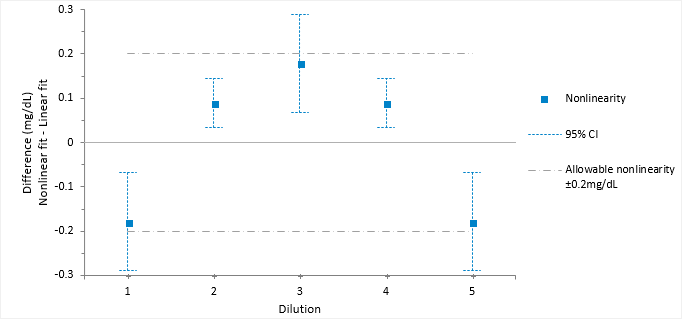
The linearity plot differences now lie within the allowable nonlinearity of 0.2 mg/dL. Therefore, the method is declared as linear within 0.2mg/dL between the reduced interval 4.65 and 15.4 mg/dL.

EP06 linearity plot showing linearity

Tutorials v6.15