ANOVA and ANCOVA with the right multiple comparison One-way, two-way, and multi-factor ANOVA and ANCOVA — with nine multiple comparison procedures, interaction plots, effect means, leverage plots, and full residual diagnostics.

Beyond the one-way case

Excel’s built-in ANOVA produces a one-way table and stops. No multiple comparisons, no covariates, no multi-factor models, no diagnostics. But most real experiments don’t have a single factor — and knowing that “something differs” is rarely the question you need answered. Which groups differ? By how much? Does adding a covariate change the conclusion? Does the effect of one factor depend on the level of another?

Answering those questions takes multi-factor ANOVA with interaction terms, ANCOVA with covariates, nine multiple comparison procedures that each control the error rate for a different type of question, and the diagnostic plots to confirm the model is trustworthy before you report the result. The same iterative build-examine-refine workflow as regression — because an ANOVA model has the same assumptions and the same ways of going wrong.

It allows me to have a large amount of tests and statistical analysis of low and medium complexity within a database such as excel which saves time associated with eventual data imports from other sources, that the data to be analyzed can be calculated and organized using standard Excel tools, such as links, formulas and dynamic tables.
Rafael B.
Head of Oceanography department

What’s included

Compare groups with one-way ANOVA

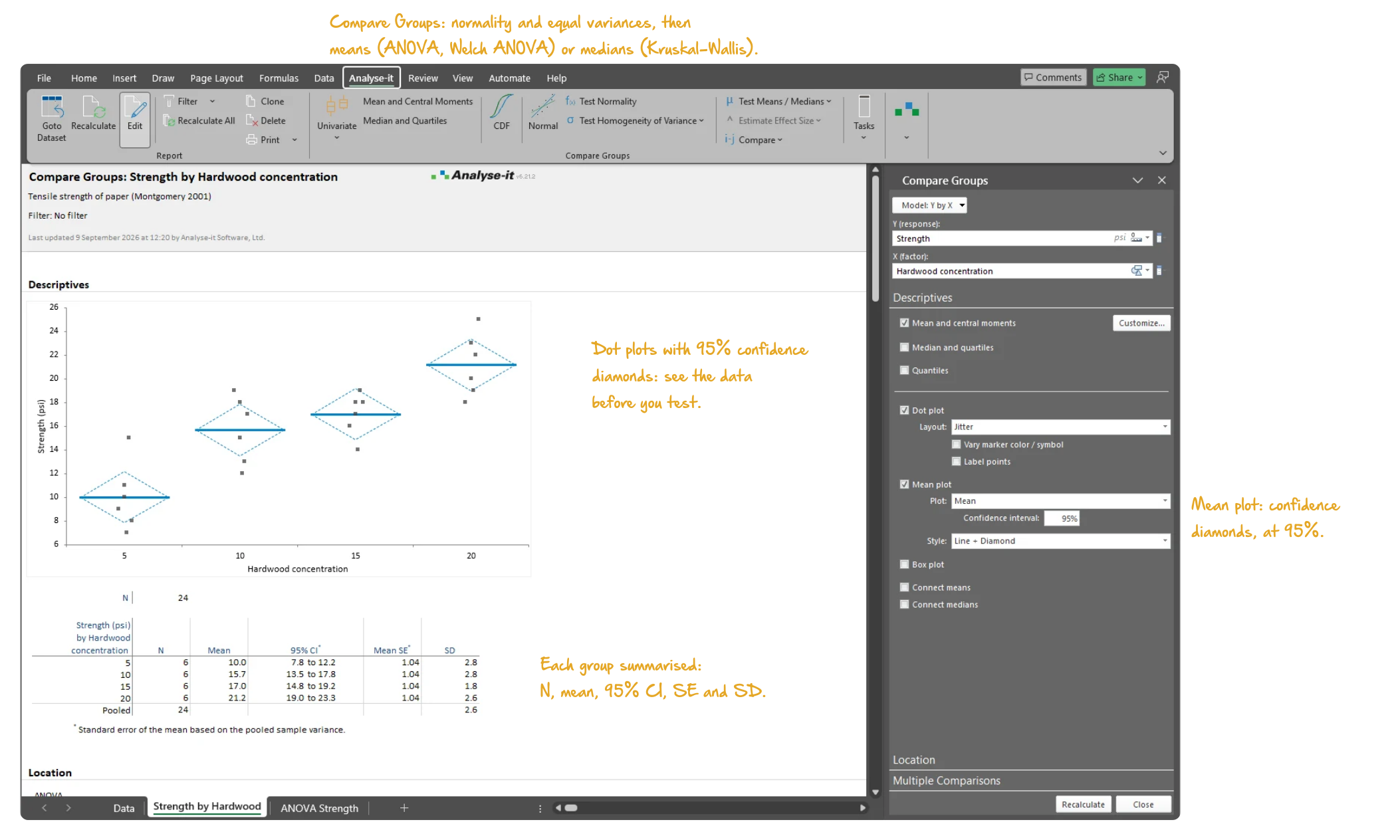
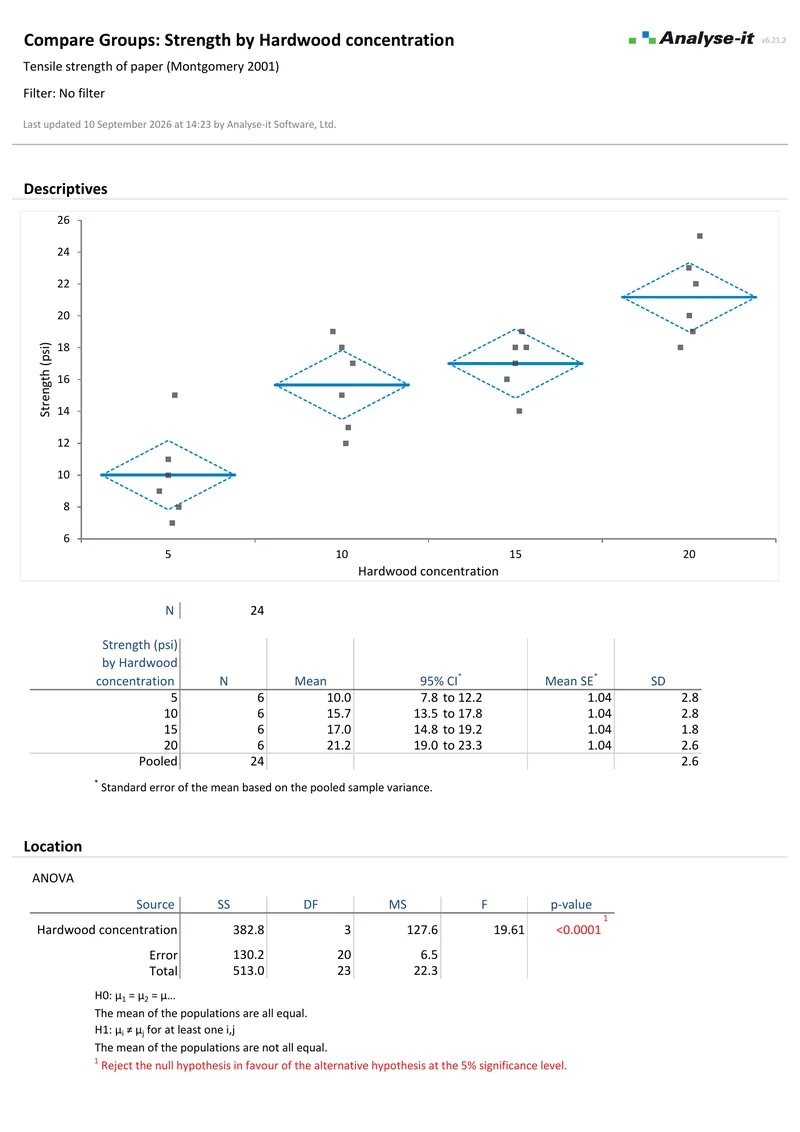
Start with a straightforward question: do these groups differ? One-way ANOVA tests that, with Welch’s ANOVA when the variance assumption doesn’t hold and Kruskal-Wallis when normality is in doubt. Side-by-side dot plots with confidence diamonds show the data before you commit to a test.
Go beyond one-way with multi-factor designs

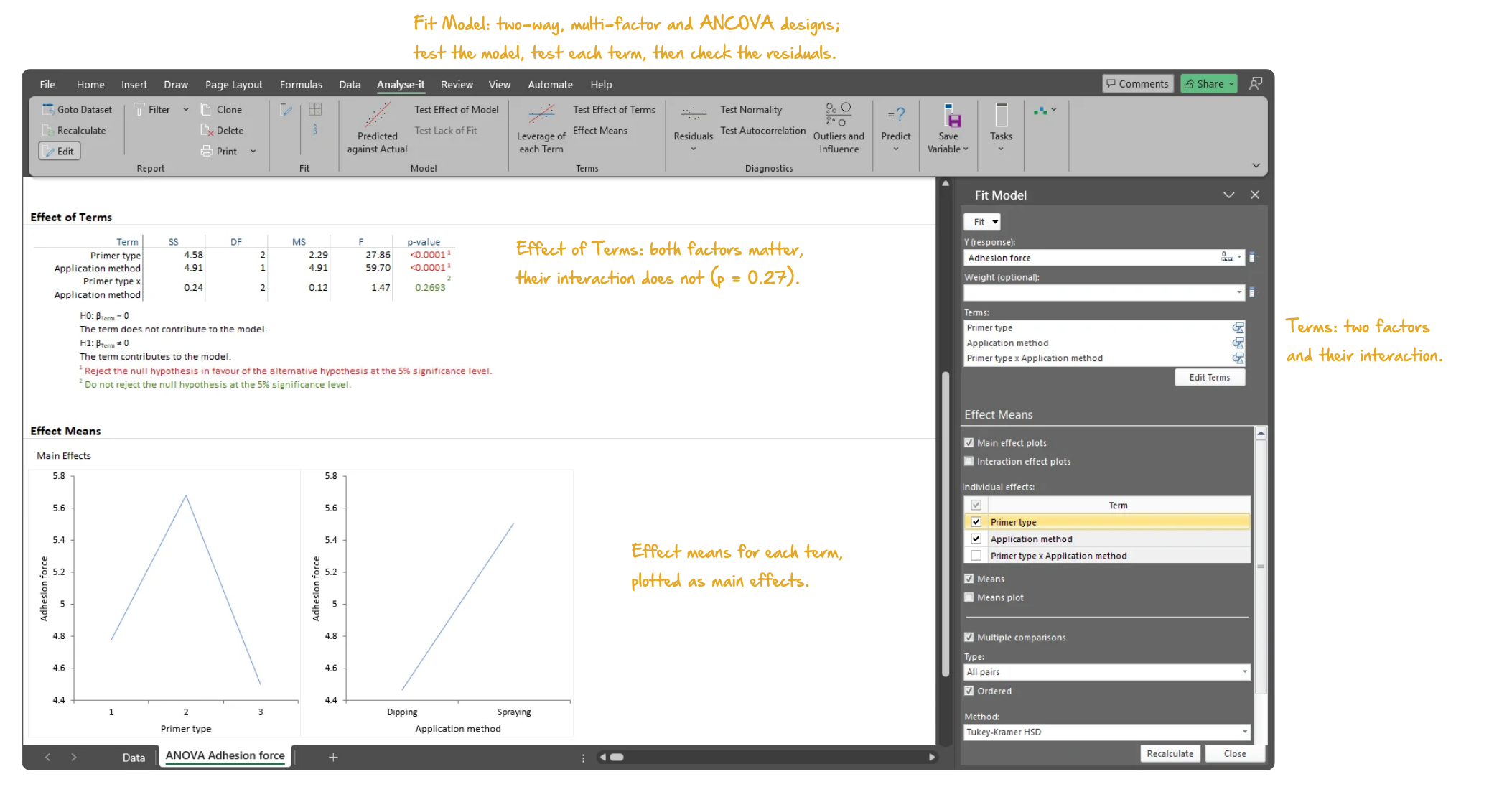
Real experiments rarely have a single factor. Add a second factor to test for an interaction, include a continuous covariate to adjust for baseline differences, or build a full factorial to see every combination. Two-way, multi-factor, ANCOVA — the model matches the design, and Type I and Type III tests show which terms matter.
Find out which groups differ, not just that something does

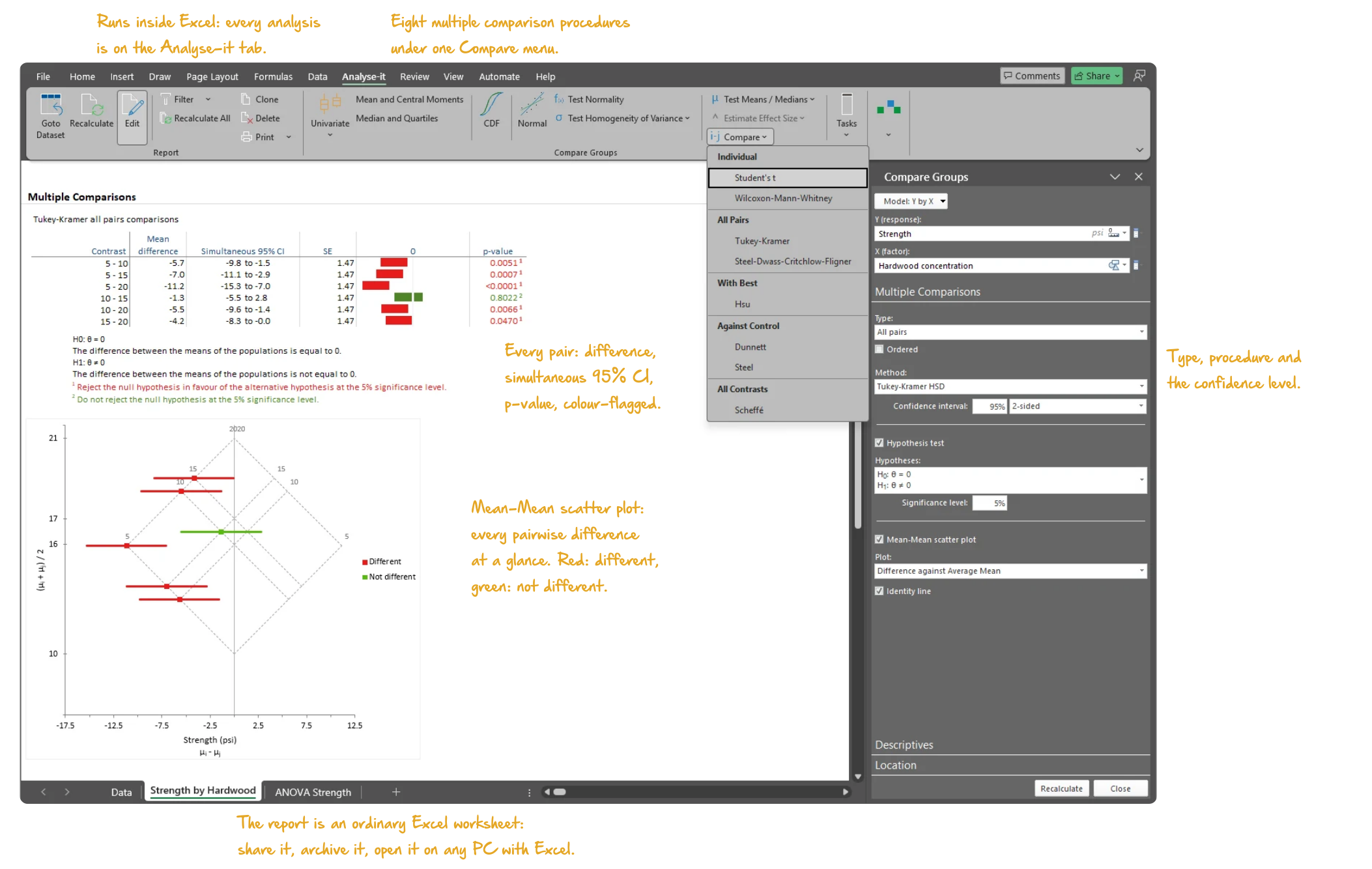
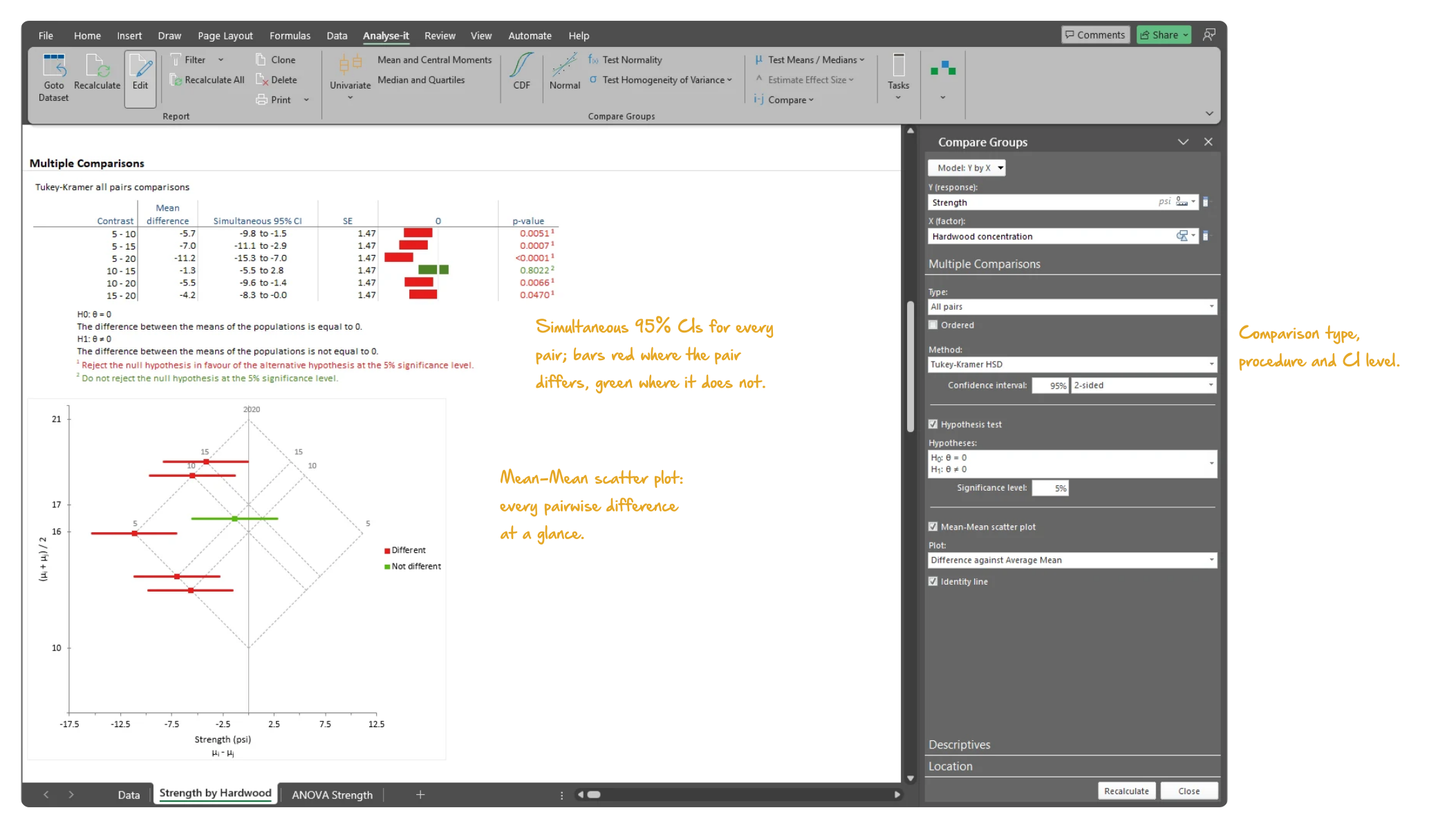
A significant ANOVA is the start, not the answer. Nine multiple comparison procedures answer the specific follow-up question — all pairs with Tukey-Kramer, against a control with Dunnett, with the best using Hsu — each controlling the family-wise error rate for its comparison structure. The Mean-Mean scatter plot shows every pairwise difference at a glance.

See how factors combine

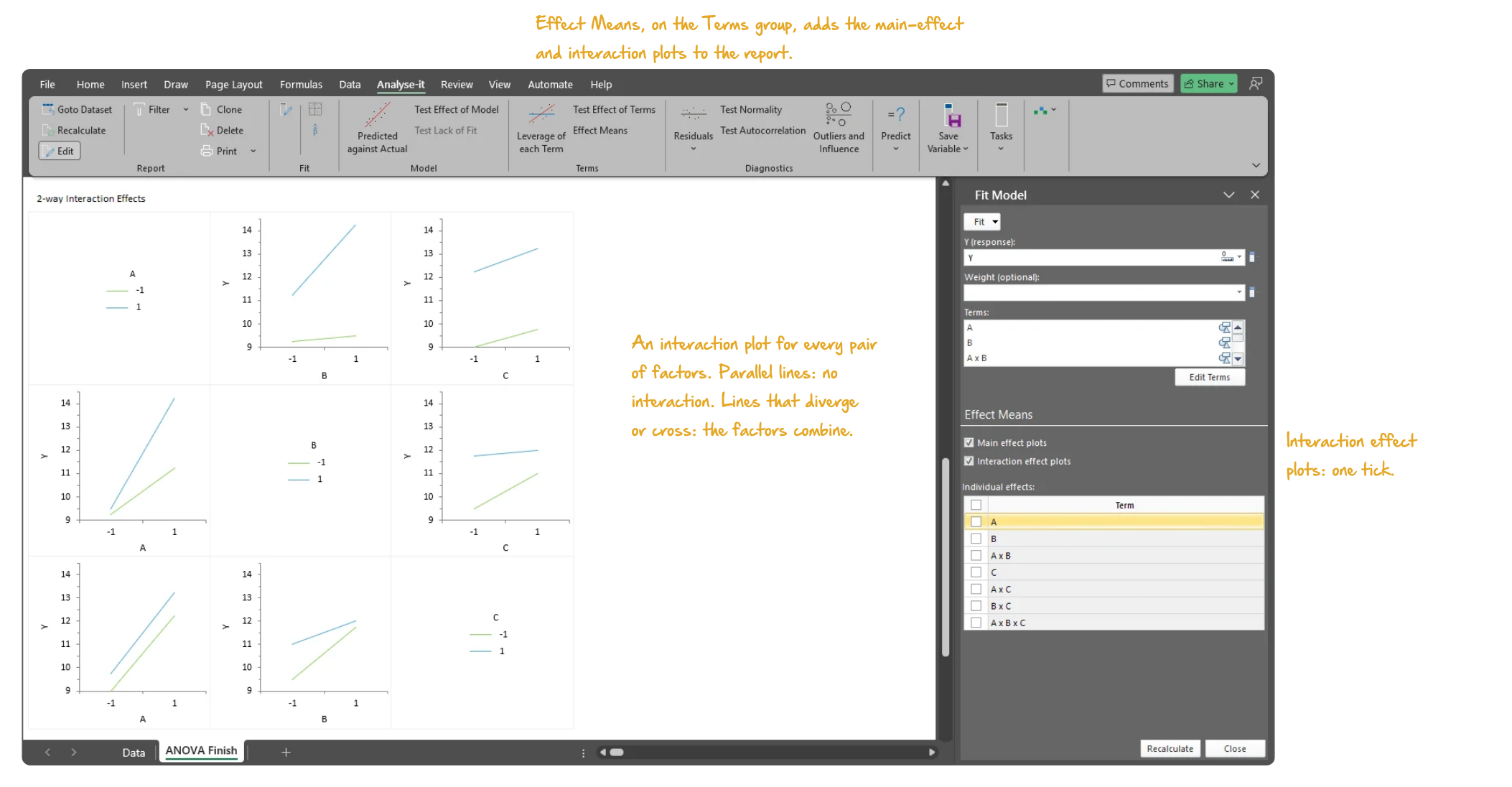
Effect means and interaction plots show whether factors work together or against each other. A main effect that looks strong on its own can disappear — or reverse — in the presence of an interaction. Leverage plots isolate each term’s contribution after accounting for everything else in the model.
Spot the observations that are driving the result

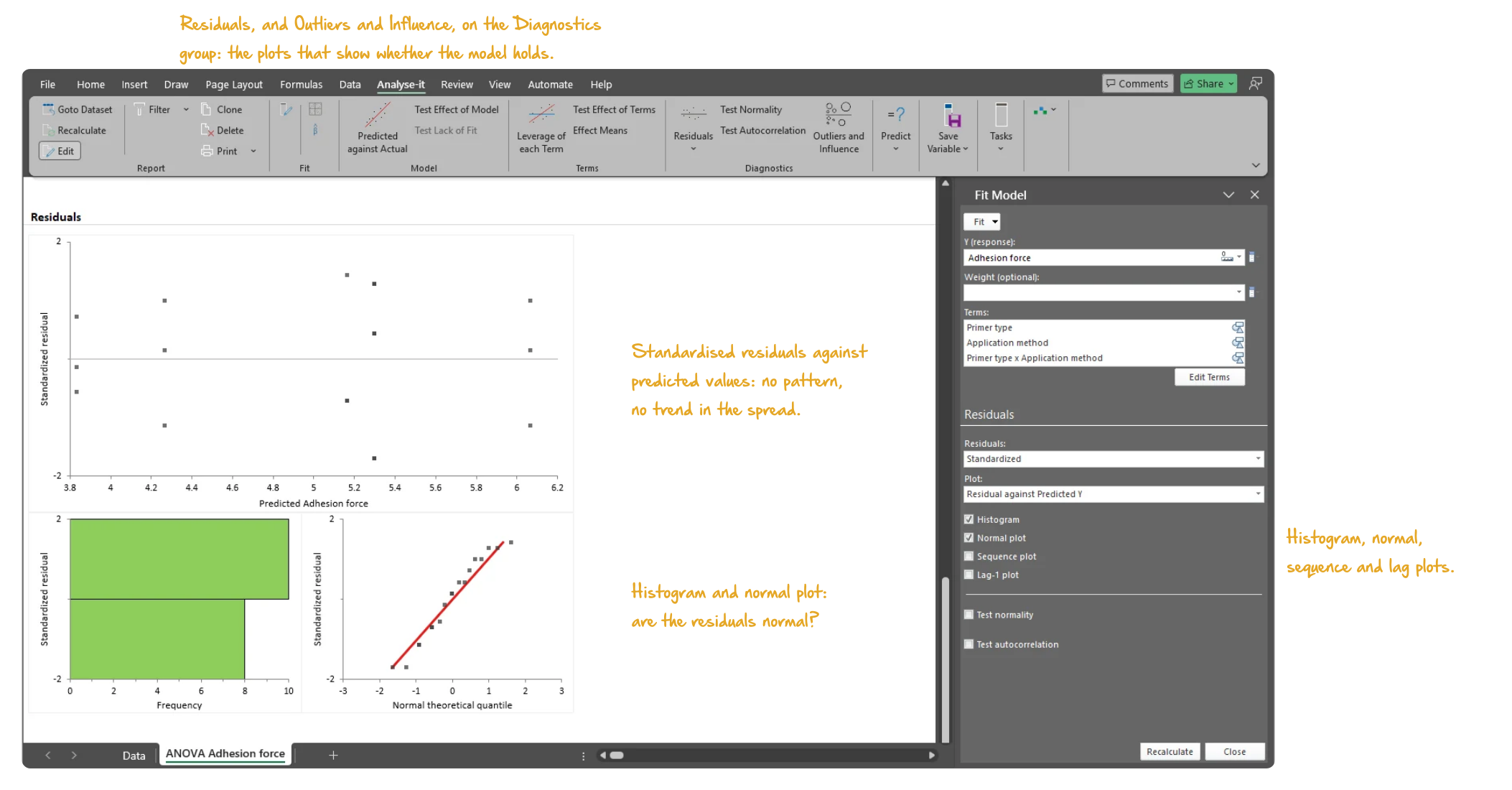
The Outlier and Influence plot shows Cook’s D against Studentised Residuals for every observation — so you can see immediately whether your conclusions depend on a handful of unusual cases. Residual plots reveal non-normality and non-constant variance that the ANOVA table won’t show. Save residuals, leverage, and Cook’s D back to the dataset for further investigation.
Example analyses

See ANOVA results in detail — ANOVA tables, multiple comparisons, interaction plots, and diagnostics — using real datasets you can download and follow along with.
ANOVA 1 One-way ANOVA
Tensile strength by hardwood concentration.
4 groups × 6 observations. Dot plots with confidence diamonds, Tukey-Kramer all-pairs with 21 contrasts, Mean-Mean scatter plot.
ANOVA 2 Two-way ANOVA
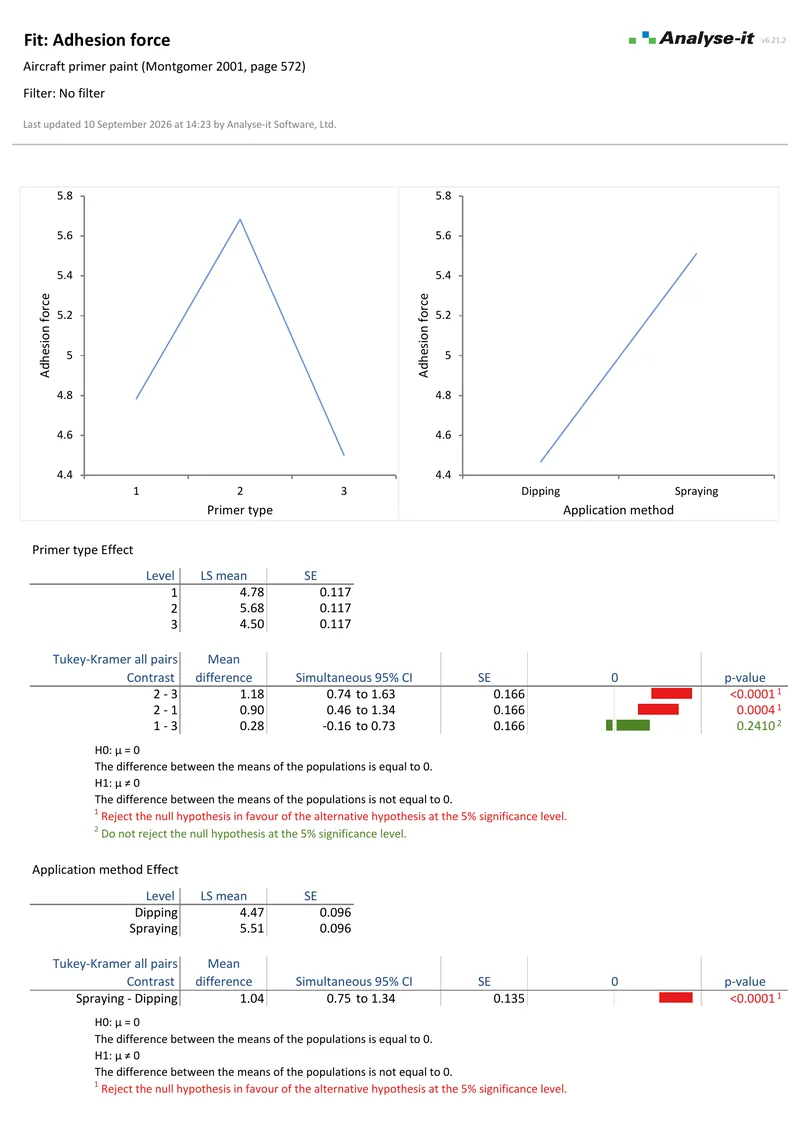
Aircraft primer paint adhesion.
3 primers × 2 application methods, R² = 0.908. Type III F-tests, LS means, main effect plots, Tukey-Kramer on both factors.
ANOVA 3 2³ full factorial
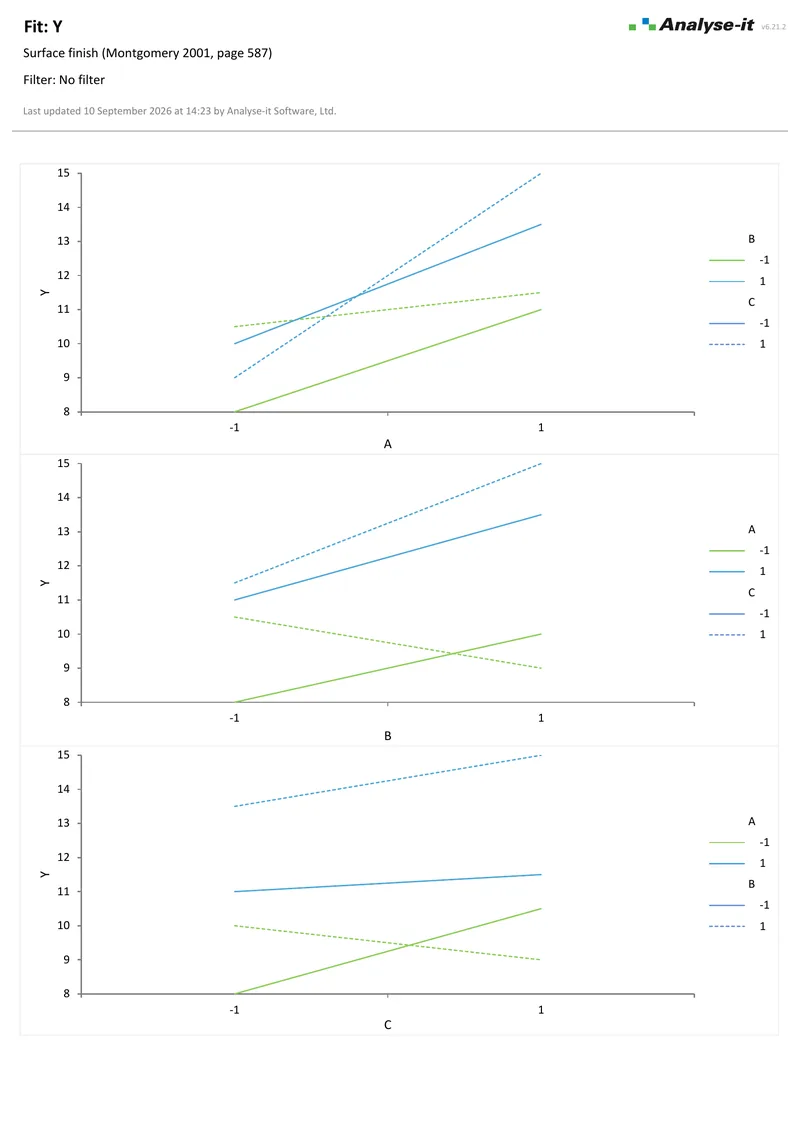
Surface finish.
Three-factor ANOVA with all two-way and three-way interactions, 16 observations. Main effect plots and all six interaction plots.
ANOVA 4 ANCOVA
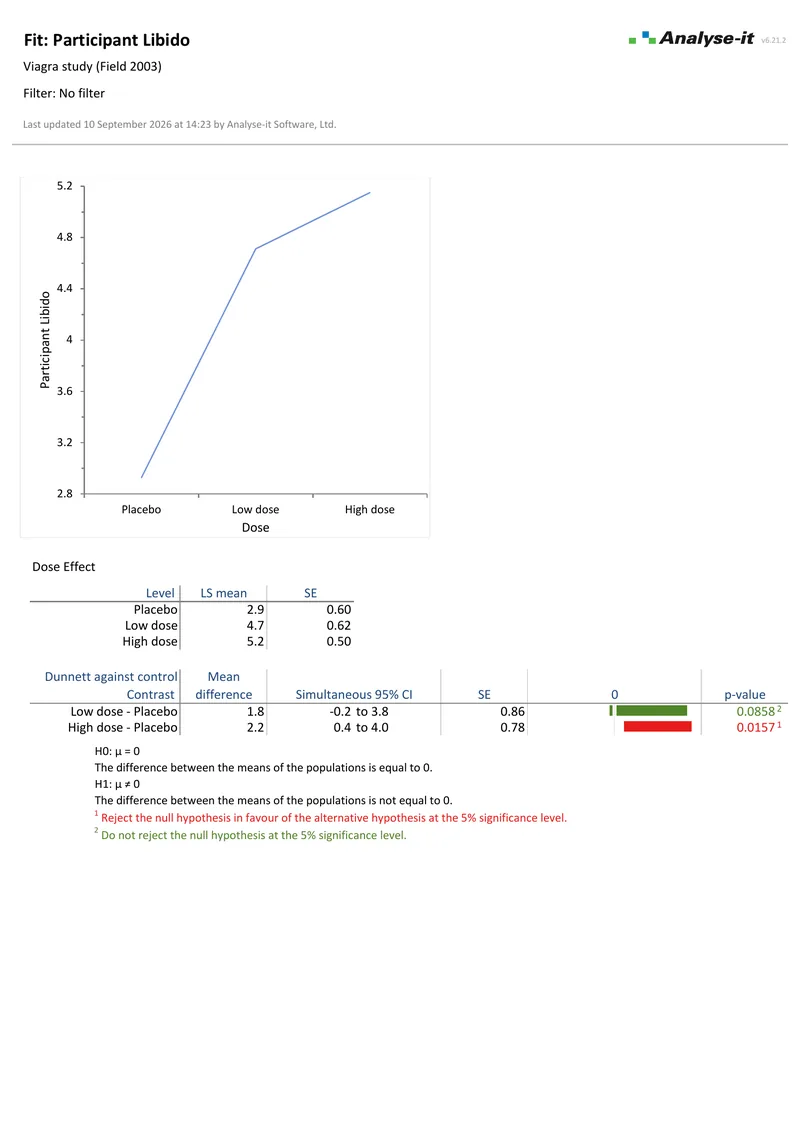
Libido by Viagra dose with covariate.
3-level factor with partner’s libido covariate, 30 observations. Type III F-tests, LS means, Dunnett against placebo.
Compare Groups 1 Compare groups — t-test
Calcium supplementation and blood pressure.
2 groups (11 calcium, 10 placebo). Side-by-side box plots, Fisher F-test, independent-samples t-test.
Compare Groups 2 Compare groups — one-way ANOVA
Y by brand, 7 groups.
Levene’s test, one-way ANOVA, Tukey-Kramer with 21 contrasts, Mean-Mean scatter plot.
Compare Pairs Compare pairs
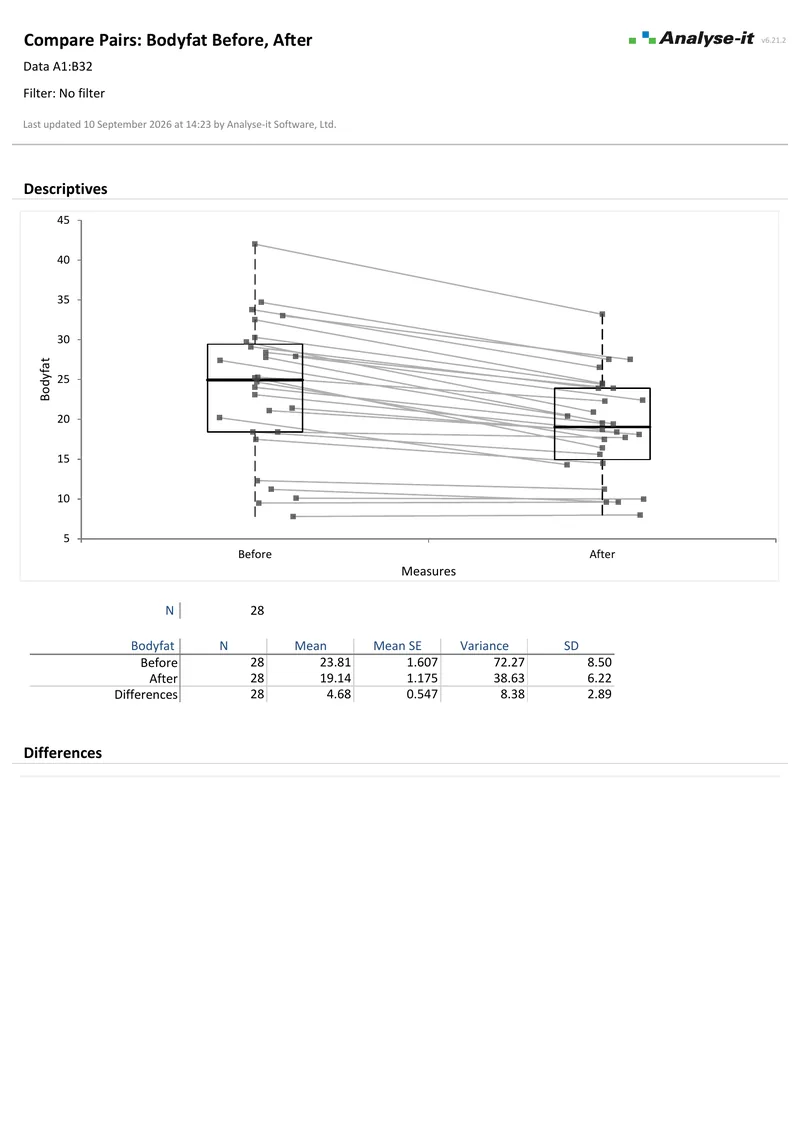
Body fat before and after exercise.
28 paired observations. Box plots with paired lines, difference plot with Hodges-Lehmann shift, Wilcoxon signed-ranks.

Part of the Standard edition

ANOVA and ANCOVA are one part of a complete statistical analysis toolkit. The Standard edition also includes simple and multiple regression, logistic regression, PCA and factor analysis, descriptive statistics, hypothesis testing, correlation, and categorical data analysis. See everything in the Standard edition →

Validated, reliable, trusted for over 30 years

Validated calculations Every statistic tested against NIST Standard Reference Datasets, published datasets and thousands of internal test-cases. No reliance on Excel'sbuilt-in functions. See how we develop and validate Analyse-it →
Data stays on your PC No cloud processing, no uploads, no third-party access. Your data never leaves your computer — essential when working with sensitive, confidential, or patient-identifiable data.
Standard Excel workbooks Analyses are ordinary Excel workbooks that you can share with colleagues, archive for audit, and open on any machine with Excel — no Analyse-it licence required.
No formulas to break Results contain no formulas, so they can't be accidentally edited or corrupted. The results you reported will be exactly what you find when you reopen the workbook.

Technical details

One-way ANOVA (Compare Groups)

  • One-way between-subjects ANOVA
  • Welch’s ANOVA for unequal variances
  • Kruskal-Wallis non-parametric test
  • Bartlett, Levene, Brown-Forsythe homogeneity of variance tests
  • One-way within-subjects ANOVA (repeated measures)
  • Friedman non-parametric test

Multi-factor ANOVA & ANCOVA (Fit Model)

  • Two-way and multi-factor designs
  • Crossed factors, polynomial terms, interactions
  • Continuous covariates (ANCOVA)
  • Automatic dummy variable coding
  • Full factorial and custom model structures
  • Type I (sequential) and Type III (partial) SS

Fit statistics

  • ANOVA table (SS, DF, MS, F, p-value)
  • R², adjusted R²
  • Parameter estimates with confidence intervals
  • Model equation
  • Save fitted values, residuals, standardised residuals, studentised residuals, leverage, Cook’s D

Multiple comparisons (Compare Groups)

  • All pairs: Tukey-Kramer, Dwass-Steel-Critchlow-Fligner
  • Against control: Dunnett, Steel
  • With best: Hsu
  • All contrasts: Scheffé
  • Individual: Student’s t, Wilcoxon-Mann-Whitney
  • Mean-Mean scatter plot

Multiple comparisons (Fit Model)

  • All pairs: Tukey-Kramer
  • Against control: Dunnett
  • With best: Hsu
  • All contrasts: Scheffé
  • Individual: Student’s t

Effect means & interaction

  • Adjusted effect means with confidence intervals new in v4.80
  • Main effect plots new in v4.80
  • Interaction plots new in v4.80
  • Leverage (partial residual) plots

Diagnostic plots

  • Raw and standardised residual plots
  • Sequence and lag plots
  • Residual distribution plot
  • Outlier and Influence plot (Cook’s D, Studentised Residuals)