Correlation analysis with scatter plots and matrices Pearson, Spearman and Kendall correlation coefficients with confidence intervals — colour-mapped correlation matrices, scatter plot matrices and tests for linear and monotonic association.

Every feature from all five editions for 15 days.
Standard edition from US$ 155 a year · 30-day money-back guarantee.
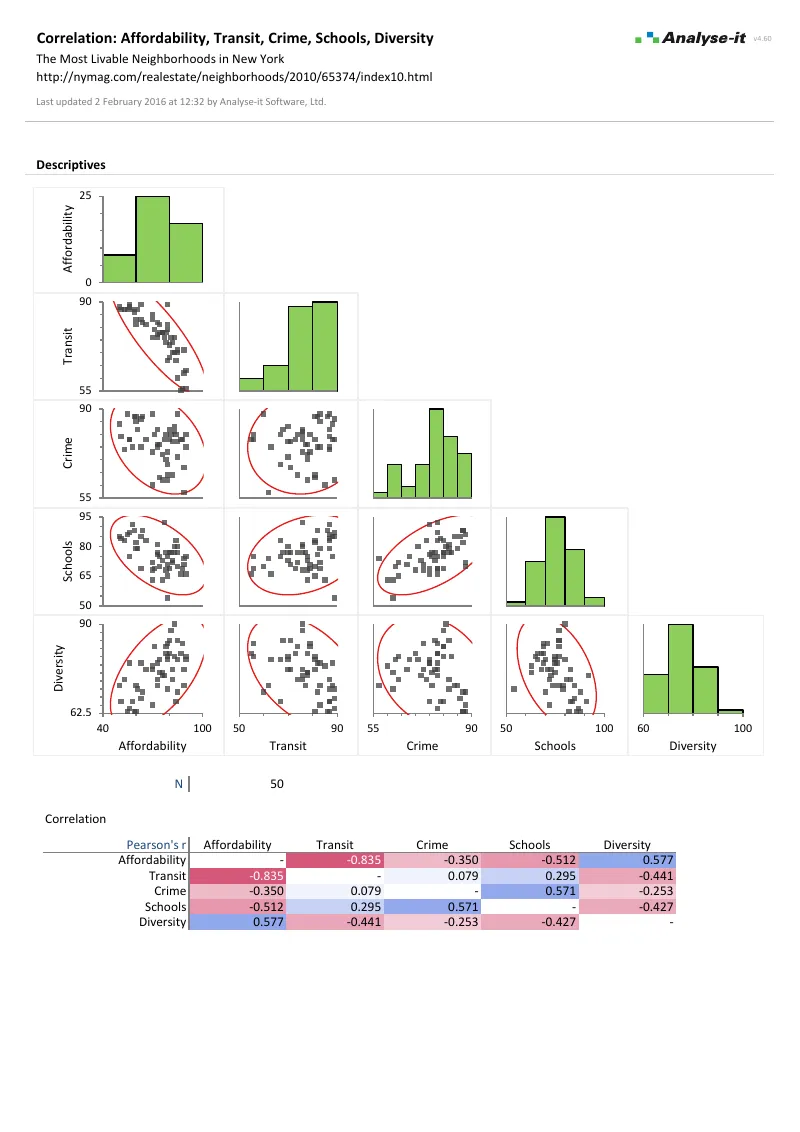
Microsoft Excel with the Analyse-it tab selected, showing the Correlation section of a correlation report for five liveability ratings of New York neighbourhoods: the colour-mapped Pearson's r matrix, the table of every pair with its Pearson r, 95% confidence interval and p-value, and the Correlation task pane open on the Correlation section. Handwritten notes: Runs inside Excel: every analysis is on the Analyse-it tab; Correlation: matrix, scatter matrix, tests and CIs, on the ribbon; Correlation matrix, colour-mapped; Pearson r for each pair with its 95% CI and test; Estimator: Pearson, Spearman or Kendall; The report is an ordinary Excel worksheet: share it, archive it, open it on any PC with Excel.

See the relationships before you model them

Excel’s CORREL function returns one Pearson coefficient and stops. No confidence interval, no significance test, no Spearman or Kendall, no scatter plot matrix. A coefficient alone is not enough. A strong Pearson r can hide a non-linear pattern, and a weak r can mask a relationship that is clear in one subgroup and absent in another.

Which variables are related, and how strongly? Is the relationship linear, monotonic or something else entirely? Does it hold within every group, or only overall? Correlation is the exploratory step between describing variables individually and fitting a regression model, and it needs both the numbers and the pictures.

Colour-mapped correlation matrix and covariance matrix

With many variables, the pattern matters more than any one number. The colour-mapped correlation matrix shows the strength and direction of every pairwise relationship — strong positive in one colour, strong negative in another, weak associations fading towards neutral. Which variables cluster together is visible immediately, without reading the individual coefficients. The covariance matrix is available alongside it.

  • Correlation matrix with colour map on coefficients
  • Covariance matrix
  • Rank correlation matrix; square, upper or lower triangular layout

Scatter plot matrix, scatter plot and points coloured by a factor

A correlation coefficient summarises a relationship in one number. A scatter plot matrix shows what that number hides — non-linear patterns, clusters, outliers and subgroups that behave differently from the whole. Colour the observations by a factor to see whether a relationship that holds overall fails within groups. The same colouring shows a relationship that looks weak overall but is strong within each group.
  • Scatter plot
  • Scatter plot matrix
  • Density ellipses and histograms on the scatter plot matrix
  • Vary points by colour based on a factor
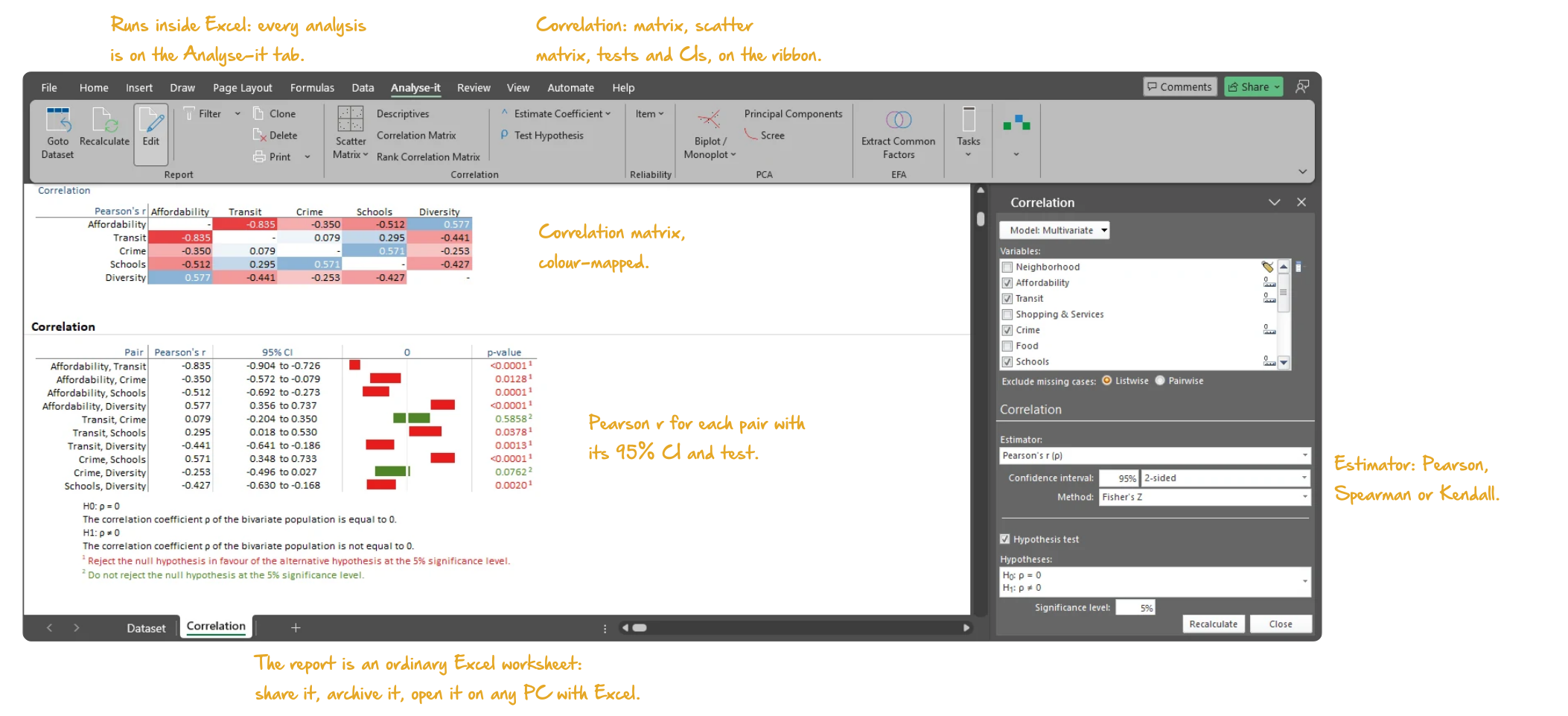
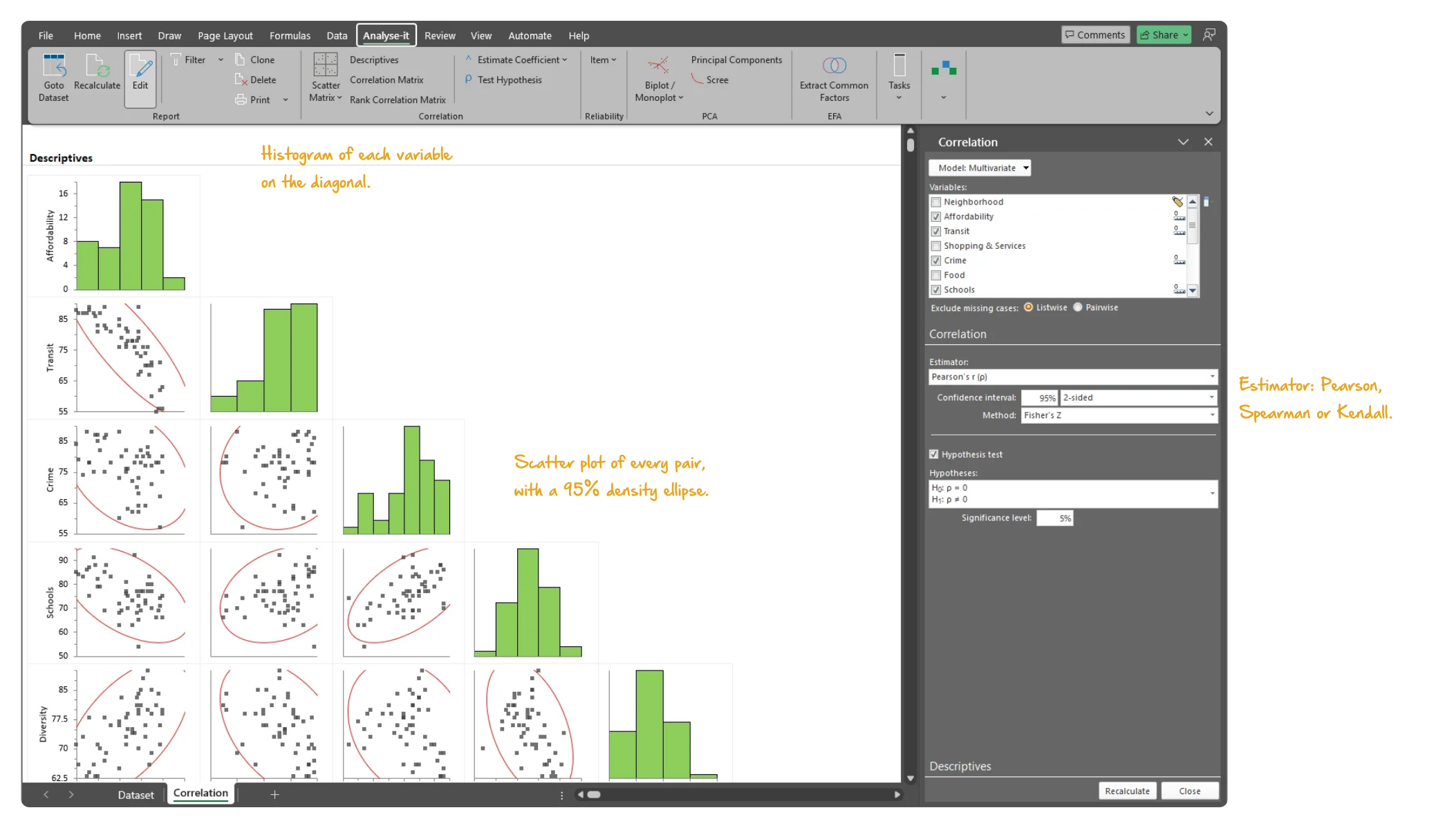
Microsoft Excel showing the Descriptives section of a correlation report for five liveability ratings of New York neighbourhoods: the scatter plot matrix with a histogram of each variable on the diagonal and a 95% density ellipse on every panel, with the task pane open on the Descriptives section. Handwritten notes: Histogram of each variable on the diagonal; Scatter plot of every pair, with a 95% density ellipse; Estimator: Pearson, Spearman or Kendall.
Scatter plot matrix for five liveability ratings of 50 New York neighbourhoods: a histogram of each variable on the diagonal, a 95% density ellipse on every panel.

Pearson r, Spearman rs and Kendall τ with confidence intervals

The coefficient should match the relationship. Pearson r measures linear association. Spearman rs measures monotonic association — use it when the relationship is consistent in direction but not necessarily straight. Kendall τ measures concordance and is more robust with small samples or tied values. Each comes with a confidence interval — Fisher’s Z for Pearson and Spearman, Samara-Randles for Kendall — not just a point estimate.
  • Pearson r correlation coefficient with Fisher’s Z CI
  • Spearman rs correlation coefficient with Fisher’s Z CI
  • Kendall τ correlation coefficient with Samara-Randles CI
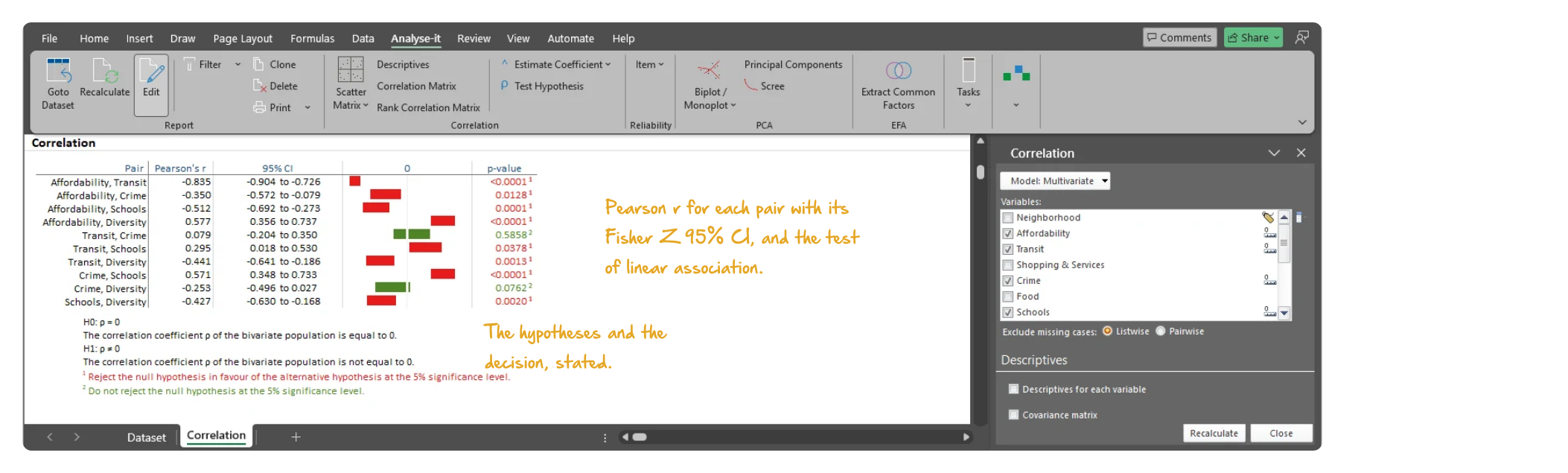
Microsoft Excel showing the pairwise table of a correlation report for five liveability ratings of New York neighbourhoods: each pair with its Pearson r, Fisher's Z 95% confidence interval and p-value, the null and alternative hypotheses stated beneath, and the task pane open on the Correlation section. Handwritten notes: Pearson r for each pair with its Fisher Z 95% CI, and the test of linear association; The hypotheses and the decision, stated.
Pearson r for each pair of the five liveability ratings, with its Fisher’s Z 95% CI and the test for linear association, and the Correlation task pane.

Pearson and Kendall tests for linear and monotonic association

A confidence interval shows how strong the association is; a test shows whether it could be zero. The Pearson test checks for linear association and the Kendall test for monotonic association. Each states the null and alternative hypotheses, reports the p-value and gives the conclusion at the chosen significance level.

  • Pearson test for linear association
  • Kendall test for monotonic association

Example analyses

See correlation results in detail — colour-mapped matrices, scatter plot matrices and pairwise coefficients with CIs.

Correlation 2 pages Correlation matrix
New York neighbourhood liveability, 5 variables.
50 observations. Pearson r matrix with a colour map, a scatter plot matrix and every pairwise coefficient with a 95% CI and a significance test.

Part of the Standard edition

Correlation is one part of a complete statistical analysis toolkit. The Standard edition also includes ANOVA and ANCOVA, simple and multiple regression, logistic regression, PCA and factor analysis, descriptive statistics, hypothesis testing and categorical data analysis. See everything in the Standard edition →

Choose and interpret the coefficient with Pearson, Spearman or Kendall? If the goal is to compare two measurement methods, read why correlation is the wrong statistic.

Software you can trust

Validated calculations Every statistic tested against the NIST Statistical Reference Datasets, published datasets and thousands of internal test cases. No reliance on Excel’s built-in functions. How Analyse-it is developed and validated →
Data stays on your PC No cloud processing, no uploads, no third-party access. Your data never leaves your computer — essential when working with sensitive, confidential or patient-identifiable data.
Standard Excel workbooks Analyses are ordinary Excel workbooks that you can share with colleagues, archive for audit and open on any machine with Excel — no Analyse-it licence required.
No formulas to break Results contain no formulas, so there is nothing to overwrite and no cell reference to break. The results you reported will be exactly what you find when you reopen the workbook.

Free trial and pricing

Try it on your own data first. The 15-day trial is every feature from all five editions — install it and start straight away.

Standard edition: US$ 155 per year or US$ 395 for a perpetual licence. Every purchase carries a 30-day money-back guarantee. Need a quote for purchasing? Add the licence to the cart and save it as a PDF quote.