Statistics add-in software for statistical analysis in Excel
  • Tutorials
  • Estimating the precision of a measurement procedure (CLSI EP05-A3)

Estimating precision for a multi-site study

Estimate the precision of the measurement procedure at multiple sites and samples.

  1. Open the file tutorials\EP05-A3 Appendix B.xlsx.

    The worksheet opens showing 4 columns. The Sample column identifies the levels of the analyte in the sample (6 levels). Laboratory identifies the site (3 laboratories), Run identifies the run (5 runs per site). CA19-9 (kU/L) identifies the measured value for 5 replicates of sample in each run.

  2. Click a cell in the dataset.
  3. On the Analyse-it ribbon tab, in the Statistical Analyses group, click Precision, and then click 2 Factor Nested.
    The analysis task pane opens.
  4. In the Y drop-down list, select CA-19.
  5. In the Factor A drop-down list, select Laboratory.
  6. In the Factor B nested within Factor A drop-down list, select Run.
  7. In the By drop-down list, select Sample.
  8. In the Estimator drop-down list, select SD.
  9. In the Confidence Interval edit box, type 95%, and then in the Method drop-down list, select Exact / Satterthwaite.
  10. In the Conditions drop-down list, select Reproducibility / Repeatability to label the innermost variance component repeatability and the outermost reproducibility.
  11. On the Analyse-it ribbon tab, in the MSA group, click Variability plot.
  12. On the Analyse-it ribbon tab, in the MSA group, click Identify Outliers, and then on the analysis task panel in the Granularity drop-down list, select Level, Factor A so that outliers are detected for each sample and laboratory.
  13. Click Calculate.

    The analysis report opens.

The variability plots show a simple visual assessment of the closeness of agreement between the measured quantity values. The purple lines show the mean of each run, the light blue lines show the mean of each laboratory, and the dark blue line the overall grand mean.
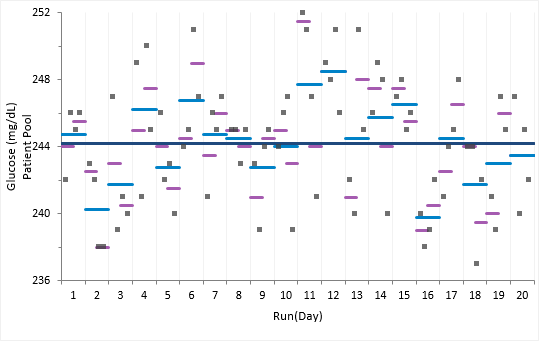
You should observe the scatter of the points to ensure there are no obvious problems. No individual measurements stand out as highly aberrant relative to the bulk of the data and none of the plots exhibit any apparent drift capable of distorting the results.

Note: To see an example of a dataset that contains outliers and how to deal with them see the EP15-A3 tutorial.

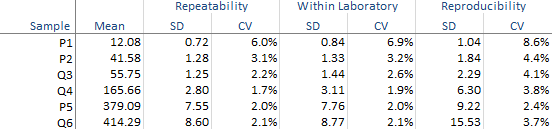
The abbreviated variance components table shows the required precision statistics expressed numerically as the standard deviation (SD) and coefficient of variation (CV).

abbreviated EP05 precision components for multiple samples

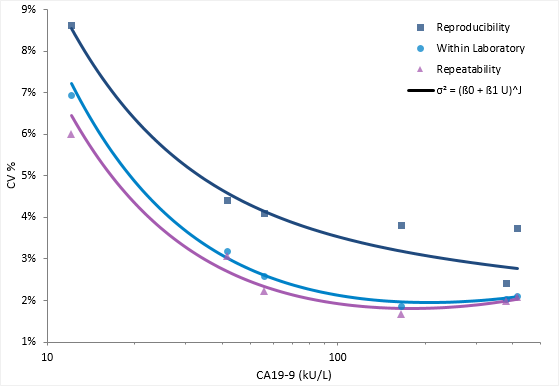
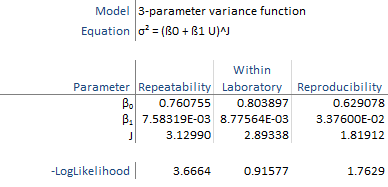
The detailed variance components table show the precision expressed numerically as the chosen measure of imprecision along with a confidence interval for each component.
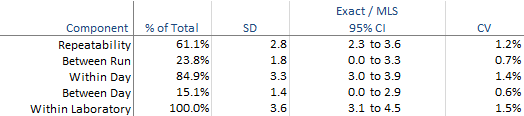
Note: You can change the imprecision to be expressed as SD, Variance, or CV and you can also change the method of computing the confidence intervals. We prefer the Exact / MLS method as the coverage is closer the nominal level in most cases.
Next topic: Fitting a precision profile

  •  Tutorials
  •  Distribution tutorial
  •  Correlation / PCA tutorial
  •  Compare groups means tutorial
  •  Association in 2-way contingency tables tutorial
  •  Simple linear regression tutorial
  •  Bland-Altman method comparison tutorial
  •  Estimating the precision of a measurement procedure (CLSI EP05-A3)
  •  Estimating precision
  •  Estimating precision for a multi-site study
  •  Fitting a precision profile
  •  Evaluating the linearity of a measurement procedure (CLSI EP06-A)
  •  Verifying the precision of a measurement procedure against a performance claim and estimating the bias (CLSI EP15-A3)
  •  Pareto charts tutorial
  •  Process control charts tutorial
  •  Process capability tutorial


Version 6.15
Published 18-Apr-2023
statistics software, statistical software for Excel
  • Products
  • Store 
  • Support
  • Blog
  • About us
  • Download trial
  •  Search
  •  Sign in
  •  Contact us
Analyse-it editions
  • Standard edition
  • Medical edition
  • Method Validation edition
  • Quality Control & Improvement edition
  • Ultimate edition

  • Blog  
  • About us
  • Contact us  
  • Privacy policy


Copyright 2026 Analyse-it Software, Ltd, Leeds, United Kingdom .
We use essential cookies to run the site, and optional analytics to improve the experience for visitors. For more information see our Privacy policy.