Enabling the add-in
Ensure the Analyse-it add-in is active in Microsoft Excel.
Microsoft Excel disables an add-in if it causes frequent crashes. This behavior prevents an add-in crashing Microsoft Excel so often that you are unable to use it. Sometimes these crashes are caused by interactions between incompatible, or unreliable add-ins installed on your computer.
- Start Microsoft Excel.
-
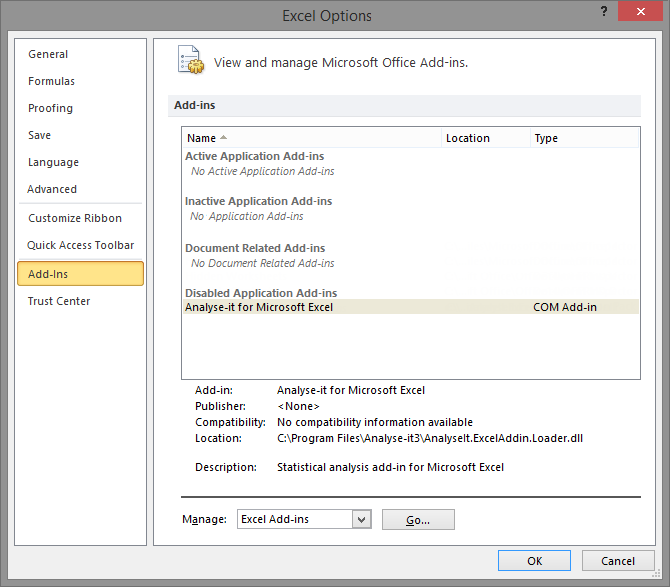
Open the Microsoft Excel Options window:
- On Excel 2007, click the Office button, and then click Excel Options.
- On Excel 2010 and Excel 2013, click File, and then click Options.
The Excel Options window opens. -
Click Add-Ins.
The list of installed add-ins opens.

-
If Analyse-it appears in the Disabled Application
Add-ins section of the Add-ins list:
-
In the Manage drop-down list, select
Disabled Items, and then click
Go....
The Disabled Items window opens.
- Select Add-in: Analyse-it for Microsoft Excel.
-
Click Enable and then click
Close.
The COM Add-Ins window closes.
- Click OK.
-
Exit and restart Microsoft Excel.
Analyse-it should automatically start.
-
In the Manage drop-down list, select
Disabled Items, and then click
Go....
Next topic: Repairing the installation