
1. Tutorials
  2. Pareto charts tutorial

Pareto charts tutorial

Learn how to apply techniques to identify the most important quality-related problems.

To illustrate the concepts, we will use data on the amount of downtime caused by problems in an automated colorimeter for measuring copper concentration. Three operators recorded the amount of downtime they each experienced during a 2-week period of operating the process.

In this tutorial you will perform the following tasks:

Identifying frequent problems

An important first step in quality improvement is identifying the most frequent occurring problems.

  1. Open the file tutorials\Colorimeter.xlsx.

    The worksheet is open with some of the data hidden. We will use the additional hidden data later in this tutorial.

  2. On the Analyse-it ribbon tab, in the Statistical Analyses group, click Pareto, and then click Single Pareto Chart.
    The analysis task pane opens.
  3. In the Variable drop-down list, select Failure.
  4. In the Frequency drop-down list, select Downtime.
  5. Select the Label frequencies, Label cumulative frequencies, and Frequency table check boxes.
  6. Click Calculate.
    The results are calculated and the analysis report opens.

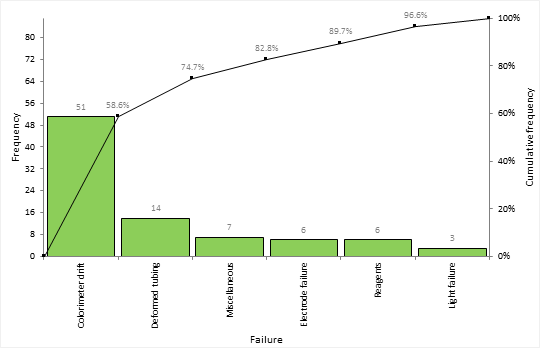
The Pareto plot bars show the amount of downtime spent fixing each failure sorted into descending order. A cumulative line shows the cumulative percentage of downtime.
Pareto chart
Based on the plot you can see:
  • 51 hours (60%) of downtime were spent dealing with colorimeter drift (for example, through recalibration).
  • Colorimeter drift and deformed tubing accounted for nearly 75% of all downtime.

Investigating stratification

It is often beneficial to dig deeper into the problems to find other factors that may be causing the issues.

  1. On the Analyse-it ribbon tab, in the Report group, click Goto dataset.

    The dataset worksheet is activated.

  2. On the Analyse-it ribbon tab, in the Statistical Analyses group, click Pareto, and then click Comparative Pareto Chart.
  3. In the Variable drop-down list, select Failure.
  4. In the Frequency drop-down list, select Downtime.
  5. In the Factor (row) drop-down list, select Operator.
  6. Select the Label frequencies and Frequency table check boxes.
  7. Click Calculate.
    The results are calculated and the analysis report opens.

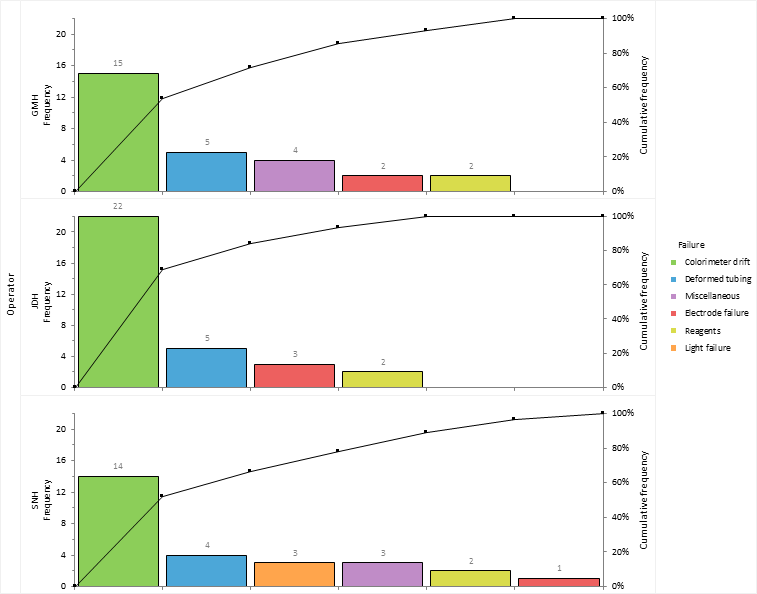
The Pareto plots show the amount of downtime stratified by the operator of the machine.
Comparative Pareto charts

Operator JDH spends more time dealing with colorimeter drift than the other operators. It is decided to implement increased operator training in re-calibrating the machine to try reduce the downtime.

Highlighting the vital few and hiding the trivial many

Sometimes a few tweaks to highlight the vital few problems and hide the trivial many can lead to increased clarity of the plots.
  1. On the Analyse-it ribbon tab, in the Pareto group, click Reorder.

    The categories panel on the analysis task pane is displayed.

  2. To sort the bars on all plots into the same order:
    1. Select the Sort all by same key check box.
    2. In the drop-down list, select JDH.
  3. To move a specific bar to the end of the list:
    1. Select the Keep specific category at end check box.
    2. In the drop-down list, select Miscellaneous.
  4. To combine categories:
    1. On the Analyse-it ribbon tab, in the Pareto group, click Combine.
    2. In the Categories list, select Electrode failure.
    3. Hold down the CTRL key, and select Bulb failure.
    4. Click Merge.
    5. In the Name column, alongside the category in the edit box, type Equipment failure.
  5. Click Recalculate.
Comparative Pareto charts

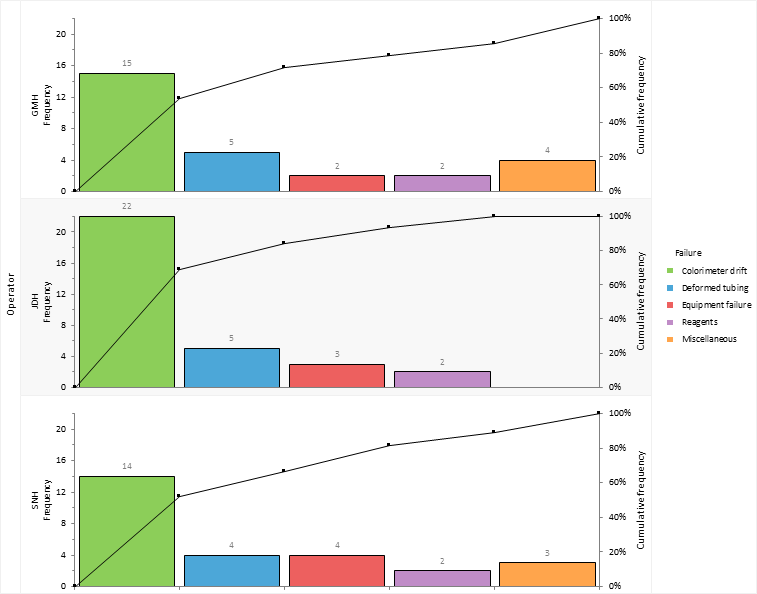
Miscellaneous problems are moved to the end of the Pareto plot. This is a sensible choice as this category comprises of all sorts of small unclassified issues that aren't of interest given the small amount of time they take up.

Problems are sorted into the same order as operator JDH who had the most total downtime making it easier to compare the plots.

Electrode failure and bulb failure are merged together into a new category named Equipment failure. These issues don't account for much downtime and resolving the problems isn't something achievable in-house without consultation with the manufacturer of the colorimeter.

Monitoring improvements

After a process improvement programme is put in place it is important to monitor the results.

  1. On the Analyse-it ribbon tab, in the Report group, click Goto dataset.
  2. On the Analyse-it ribbon tab, in the Dataset group, click Filter.

    The filter is removed from the dataset and the additional data after the training plan was implemented is shown.

  3. On the Analyse-it ribbon tab, click Return to analysis.
  4. In the Factor (column) drop-down list, select Training.
  5. Click Recalculate.

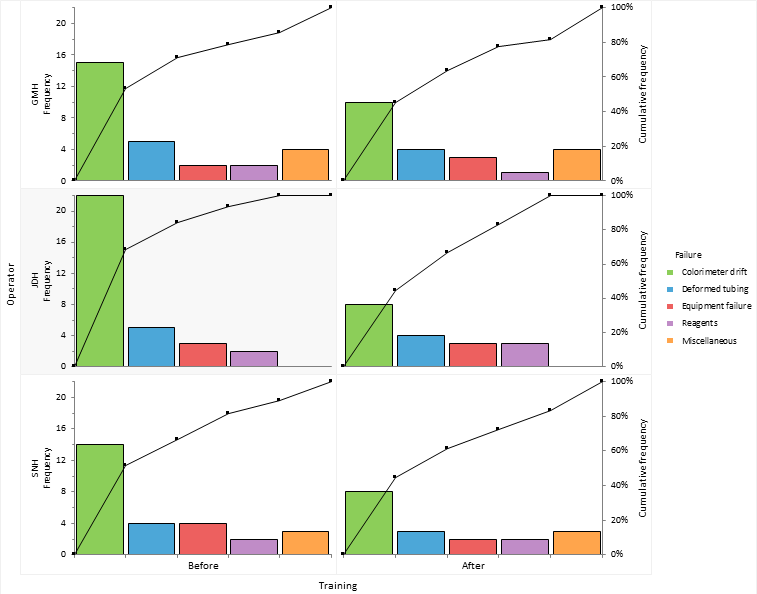
Implementing a training plan has reduced the amount of downtime dealing with the colorimeter drift issue. And the worst performing operator is now the best.
Comparative Pareto charts

Sharing knowledge

It's always good to share the knowledge with other teams and management as successful improvements can encourage other improvements and keep management on-board.

  1. On the Analyse-it ribbon tab, in the Report group, click Clone.

    The dataset worksheet and analysis task pane are displayed.

  2. In the Factor (row) drop-down list, select None.
  3. To highlight the problem we have improved:
    1. On the Analyse-it ribbon tab, in the Pareto group, click Vary color.
    2. Select the Assign Colors check box.
    3. In the Categories grid, under the Color column, alongside Colorimeter drift in the drop-down list, select the color red.
  4. Click Calculate.
    The results are calculated and the analysis report opens.

Training reduced the downtime due to colorimeter drift from 51 hours (60% of downtime) over a six week period to just 26 hours (45%) in the six week period following a new training programme.
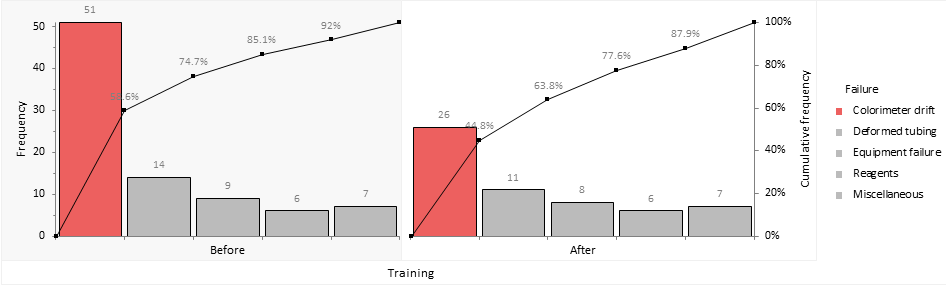
Comparative Pareto charts

Tutorials v6.15