Sharing knowledge
It's always good to share the knowledge with other teams and management as successful improvements can encourage other improvements and keep management on-board.
-
On the Analyse-it ribbon tab, in the
Report group, click
Clone.
The dataset worksheet and analysis task pane are displayed.
- In the Factor (row) drop-down list, select None.
-
To highlight the problem we have improved:
- On the Analyse-it ribbon tab, in the Pareto group, click Vary color.
- Select the Assign Colors check box.
- In the Categories grid, under the Color column, alongside Colorimeter drift in the drop-down list, select the color red.
-
Click Calculate.
The results are calculated and the analysis report opens.
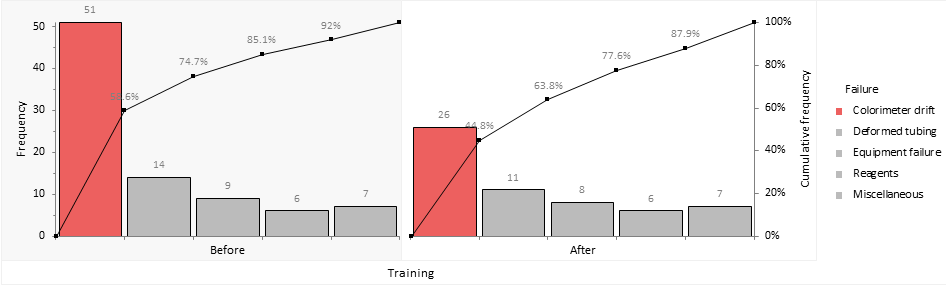
Training reduced the downtime due to colorimeter drift from 51 hours (60% of downtime) over a six week period to just 26 hours (45%) in the six week period following a new training programme.