Statistics add-in software for statistical analysis in Excel
  • Tutorials
  • Pareto charts tutorial

Investigating stratification

It is often beneficial to dig deeper into the problems to find other factors that may be causing the issues.

  1. On the Analyse-it ribbon tab, in the Report group, click Goto dataset.

    The dataset worksheet is activated.

  2. On the Analyse-it ribbon tab, in the Statistical Analyses group, click Pareto, and then click Comparative Pareto Chart.
  3. In the Variable drop-down list, select Failure.
  4. In the Frequency drop-down list, select Downtime.
  5. In the Factor (row) drop-down list, select Operator.
  6. Select the Label frequencies and Frequency table check boxes.
  7. Click Calculate.
    The results are calculated and the analysis report opens.

The Pareto plots show the amount of downtime stratified by the operator of the machine.
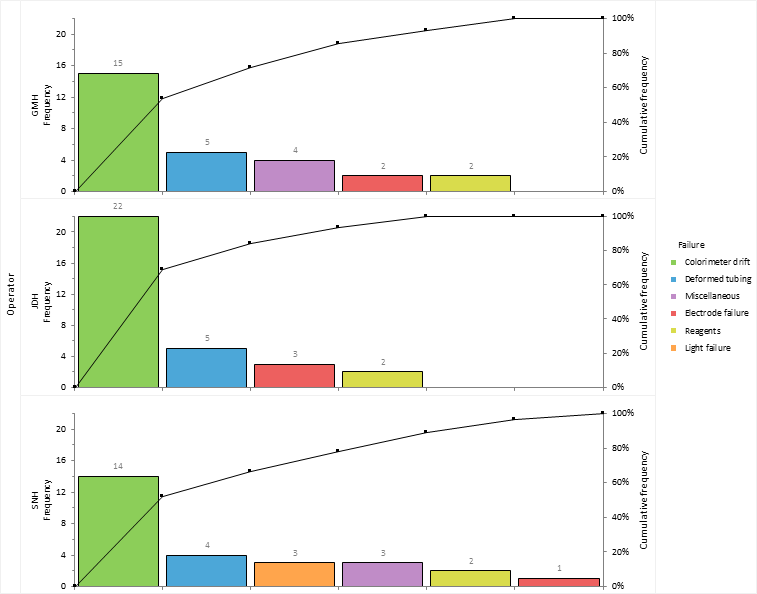
Comparative Pareto charts

Operator JDH spends more time dealing with colorimeter drift than the other operators. It is decided to implement increased operator training in re-calibrating the machine to try reduce the downtime.

Next topic: Highlighting the vital few and hiding the trivial many

  •  Tutorials
  •  Distribution tutorial
  •  Correlation / PCA tutorial
  •  Compare groups means tutorial
  •  Association in 2-way contingency tables tutorial
  •  Simple linear regression tutorial
  •  Bland-Altman method comparison tutorial
  •  Estimating the precision of a measurement procedure (CLSI EP05-A3)
  •  Evaluating the linearity of a measurement procedure (CLSI EP06-A)
  •  Verifying the precision of a measurement procedure against a performance claim and estimating the bias (CLSI EP15-A3)
  •  Pareto charts tutorial
  •  Identifying frequent problems
  •  Investigating stratification
  •  Highlighting the vital few and hiding the trivial many
  •  Monitoring improvements
  •  Sharing knowledge
  •  Process control charts tutorial
  •  Process capability tutorial


Version 6.15
Published 18-Apr-2023
statistics software, statistical software for Excel
  • Products
  • Store 
  • Support
  • Blog
  • About us
  • Download trial
  •  Search
  •  Sign in
  •  Contact us
Analyse-it editions
  • Standard edition
  • Medical edition
  • Method Validation edition
  • Quality Control & Improvement edition
  • Ultimate edition

  • Blog  
  • About us
  • Contact us  
  • Privacy policy


Copyright 2026 Analyse-it Software, Ltd, Leeds, United Kingdom .
We use essential cookies to run the site, and optional analytics to improve the experience for visitors. For more information see our Privacy policy.