Analyse-it
Analyse-it
  • Products
  • Pricing
  • Support
  • About us
Download trial Sign in
  • Administrator's Guide
  • Licensing

Activating a license

Activate a license to use the software on your computer.

  • Ensure that TCP port 443 (HTTPS) on the firewall is open for communication to secure.analyse-it.com on your computer. Analyse-it uses your internet connection to simplify activation.
  1. Start Microsoft Excel to start Analyse-it.
  2. On the Analyse-it ribbon tab, click Analyse-it, and then click Activate.
    The Activate window opens.
  3. Click Next.
    The Activate window shows the license details.
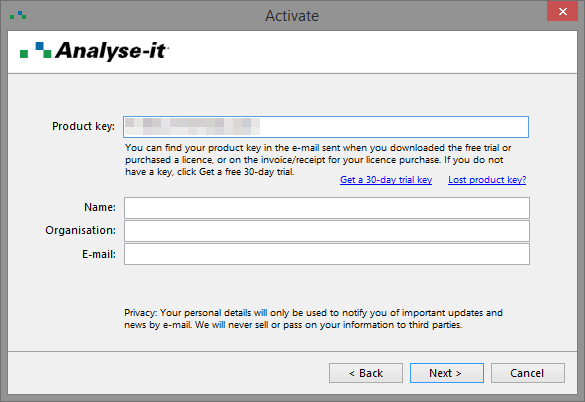
    activate license

  4. Enter the Product Key and the Name, Organisation, and E-mail of the registered user of the software.
    The registered user may occasionally receive an e-mail with important information about updates to Analyse-it. They can opt-out via the unsubscribe link in the e-mail they receive.
  5. Click Next.

    The software uses your internet connection to verify the product key and activates the license on your computer.

  6. If activation fails for any reason you must activate manually:
    1. Click Get Activation Code.
      Your browser opens the manual activation page at http://analyse-it.com/activate. If your computer does not have an internet connection, you can open the page on any computer or device with an internet connection.
    2. On the manual activation page, enter the Product Key and Site ID from the Activate window.
      Note: The Site ID is unique to each computer. Do not contact technical support asking for a Site ID as we cannot provide it. It only shows on the Activate window in the software.
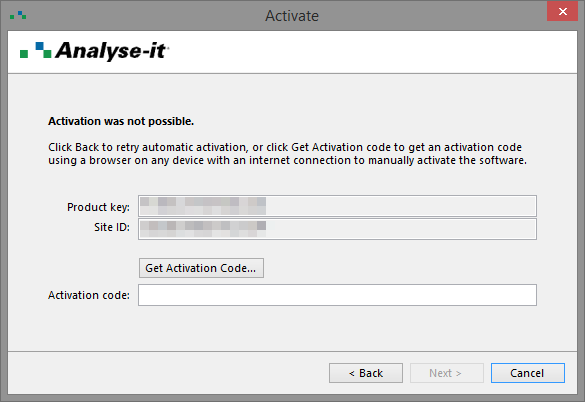
      manual activation

    3. Enter the Name, Organisation, and E-mail of the registered user of the software.
    4. Click Get Activation Code.

      The activation code shows in your browser window.

    5. In the Activate window, enter the Activation code from your browser window.
    6. Click Next.
  7. Click Close.
Related concepts
Licensing
Related reference
End-User License Agreement (EULA)

  •  What is Analyse-it?
  •  What's new?
  •  Administrator's Guide
  •  Installation
  •  Licensing
  •  Activating a license
  •  Deactivating a license
  •  Acquiring a concurrent license
  •  Releasing a concurrent license
  •  Finding out who's using a concurrent license
  •  Software updates
  •  Troubleshooting
  •  End-User License Agreement (EULA)
  •  User's Guide
  •  Statistical Reference Guide


Version 6.15
Published 18-Apr-2023
Products
  • Standard Edition
  • Medical Edition
  • Quality Control & Improvement Edition
  • Method Validation Edition
  • Ultimate Edition
  • Compare Editions
  • Pricing
Support
  • Documentation
  • Tutorials
  • Download latest version
  • Release history
  • Contact support
Company
  • About us
  • Blog
  • Contact us
  • Privacy policy

Get Started

  • Download free trial
  • Sign In

© 2026 Analyse-it® Software, Ltd. All rights reserved.

Statistical analysis and method validation software for Microsoft Excel.

We use essential cookies to run the site, and optional analytics to improve the experience for visitors. For more information see our Privacy policy.