Revising control limits
After changes in a process it is necessary to revise the control limits.
- On the Analyse-it ribbon tab, in the Report group, click Goto dataset.
-
On the worksheet, alongside the Phase column, click the
drop-down arrow, then select the OQ check box, and click
OK.
The data is filtered to the IQ and OQ phases.
- On the Analyse-it ribbon tab, click Return to analysis.
-
On the Analyse-it ribbon tab, in the
Process Control group, click
Phases.
In the analysis task pane, the By drop-down list is displayed.
- In the By drop-down list, select Phase.
- On the Control Chart panel, select the Show process parameters check box.
- Click Recalculate.
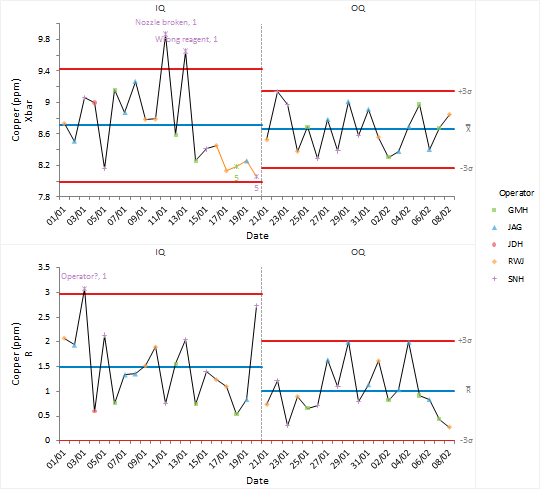
New control limits are computed for the new phase of the process. You can see the limits are much narrower and no-special cause variation is present.
Next topic: Monitoring future production