
1. Statistical Reference Guide
  2. Distribution
  3. Discrete distributions

Discrete distributions

A discrete distribution describes a variable that can only take discrete values (for example, the number of male and females, or the number of people with a specific eye color).

Frequency distribution

A frequency distribution reduces a large amount of data into a more easily understandable form.

Frequency table

A frequency table is a simple table of the frequencies in each class.

There are many ways of expressing the frequencies:
Statistic Purpose
Frequency The number of occurrences in the class.
Relative frequency The frequency divided by the total.
Frequency density The relative frequency divided by the width of the class interval.

Use with unequal class intervals.

Cumulative frequency The number of occurrences in the class and all previous classes.
Cumulative relative frequency The cumulative frequency divided by the total.

Frequency plot

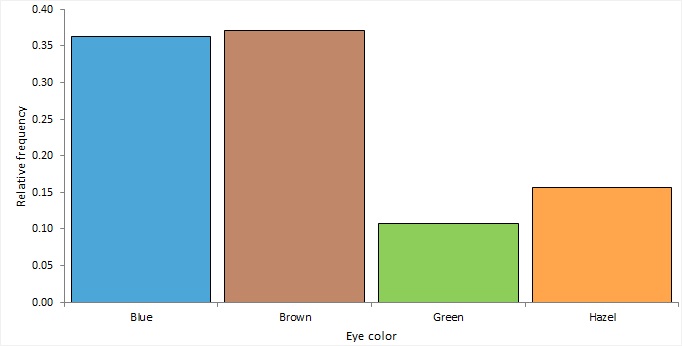
A frequency plot shows the distribution of a qualitative variable.


frequency plot

A frequency plot shows rectangular bars for each class with the height of the bar proportional to the frequency.

Whole-to-part plot

A whole-to-part plot shows how the parts make up the whole.


pie chart

A pie chart is a common representation which shows a circle divided into sectors for each class, with the angle of each sector proportional to the frequency.

A stacked bar plot shows rectangular bars for each class with the size of each bar proportional to the frequency.

The major problem with the pie chart is that it is difficult to judge the angles and areas of the sectors. It is useful if you want to compare a single class relative to the whole. For comparing classes to each other, we recommend the frequency plot or stacked bar plot for greater clarity and ease of interpretation.

Creating a frequency plot

Plot a frequency plot to visualize the distribution of a qualitative variable.

  1. Select a cell in the dataset.
  2. On the Analyse-it ribbon tab, in the Statistical Analyses group, click Distribution > Frequency plot, and then click the plot type.
    The analysis task pane opens.
  3. In the Y drop-down list, select the categorical variable.
  4. If the data are in frequency form, in the Frequency drop-down list, select the frequency count variable.
  5. Optional: To show the frequency table, select the Frequency table check box.
  6. Optional: To vary the bar color by the categorical variable, select the Vary bar color check box.
    The categories are assigned default colors. To set specific colors for each category, alongside the Y variable, click the drop-down arrow, and then click Colors / Symbols....
  7. Optional: To label the bars with the frequencies, select the Label bars check box.
  8. Optional: To overlay the cumulative frequency distribution line, select the Cumulative frequency line check box.
  9. Click Calculate.

Creating a whole-to-part plot

Plot a pie chart or bar chart to visualize the relative frequencies.

  1. Select a cell in the dataset.
  2. On the Analyse-it ribbon tab, in the Statistical Analyses group, click Distribution > Whole-to-Part, and then click the plot type.
    The analysis task pane opens.
  3. In the Y drop-down list, select the categorical variable.
  4. If the data are in frequency form, in the Frequency drop-down list, select the frequency count variable.
  5. Optional: To show the frequency table, select the Frequency table check box.
  6. Optional: To label the bars/sectors with the frequencies, select the Label bars/Label sectors check box.
  7. Click Calculate.

Inferences about Binomial distribution parameters

Inferences about the parameters of a binomial distribution are made using a random sample of data drawn from the population of interest.

A binomial distribution arises when an experiment consists of a fixed number of repeated trials; each trial has two possible outcomes; the probability of the outcome is the same for each trial; and the trials are independent, that is, the outcome of one trial does not affect the outcome of other trials.

Binomial distribution parameter estimate

A parameter estimate is either a point or interval estimate of an unknown population parameter.

A point estimate is a single value that is the best estimate of the true unknown parameter; a confidence interval is a range of values and indicates the uncertainty of the estimate.

Estimators for the parameter of a Binomial distribution

Estimators for the binomial distribution parameter and their properties and assumptions.

Estimator Purpose
Proportion Estimate the population proportion of occurrences of the outcome of interest using the sample proportion estimator.
Odds Estimate the population odds of the outcome of interest occurring using the sample odds estimator.

Odds is an expression of the relative probabilities in favor of an event.

Binomial distribution parameter hypothesis test

A hypothesis test formally tests if a population parameter is equal to a hypothesized value. For a binomial distribution, the parameter is the probability of success, commonly referred to as the proportion with the outcome of interest.

The null hypothesis states that the proportion is equal to the hypothesized value, against the alternative hypothesis that it is not equal to (or less than, or greater than) the hypothesized value. When the test p-value is small, you can reject the null hypothesis and conclude the sample is not from a population with the proportion equal to the hypothesized value.

Tests for the parameter of a Binomial distribution

Tests for the parameter of a binomial distribution and their properties and assumptions.

Test Purpose
Binomial exact Test if the proportion with the outcome of interest is equal to a hypothesized value.

Uses the binomial distribution and computes an exact p-value. The test is conservative, that is, the type I error is guaranteed to be less than or equal to the desired significance level. Recommended for small sample sizes.

Score Z Test if the proportion with the outcome of interest is equal to a hypothesized value.

Uses the score statistic and computes an asymptotic p-value. Equivalent to Pearson's X² test. Recommended for general use.

Testing Binomial distribution parameters

Test if the parameter of a binomial distribution is equal to the hypothesized value.

  1. Select a cell in the dataset.
  2. On the Analyse-it ribbon tab, in the Statistical Analyses group, click Distribution, and then click the hypothesis test.
    The analysis task pane opens.
  3. In the Y drop-down list, select the categorical variable.
  4. If the data are in frequency form, in the Frequency drop-down list, select the frequency count variable.
  5. In the Hypotheses drop-down list, select the null and alternative hypothesis.
  6. In the Hypothesized value edit box, type the expected value of the parameter under the null hypothesis.
  7. Optional: To compare the p-value against a predefined significance level, in the Significance level edit box, type the maximum probability of rejecting the null hypothesis when in fact it is true (typically 5% or 1%).
  8. Click Calculate.

Inferences about Multinomial distribution parameters

Inferences about the parameters of a multinomial distribution are made using a random sample of data drawn from the population of interest.

A multinomial distribution arises when an experiment consists of a fixed number of repeated trials; each trial has a discrete number of possible outcomes; the probability that a particular outcome occurs is the same for each trial; and the trials are independent, that is, the outcome of one trial does not affect the outcome of other trials.

Multinomial distribution parameters hypothesis test

A hypothesis test formally tests if the population parameters are different from the hypothesized values. For a multinomial distribution, the parameters are the proportions of occurrence of each outcome.

The null hypothesis states that the proportions equal the hypothesized values, against the alternative hypothesis that at least one of the proportions is not equal to its hypothesized value. When the test p-value is small, you can reject the null hypothesis and conclude that at least one proportion is not equal to its hypothesized value.

The test is an omnibus test and does not tell you which proportions differ from the hypothesized values.

Tests for the parameters of a Multinomial distribution

Tests for the parameters of a multinomial distribution and their properties and assumptions.

Test Purpose
Pearson X² Tests if the proportions are equal to the hypothesized values.

Uses the score statistic and computes an asymptotic p-value.

Likelihood ratio G² Tests if the proportions are equal to the hypothesized values.

Uses the likelihood ratio statistic and computes an asymptotic p-value.

Pearson X² usually converges to the chi-squared distribution more quickly than G². The likelihood ratio test is commonly used in statistical modeling as the G² statistic is easier to compare between different models.

Testing Multinomial distribution parameters

Test if the parameters of a multinomial distribution are equal to the hypothesized values.

  1. Select a cell in the dataset.
  2. On the Analyse-it ribbon tab, in the Statistical Analyses group, click Distribution, and then click the hypothesis test.
    The analysis task pane opens.
  3. In the Y drop-down list, select the categorical variable.
  4. If the data are in frequency form, in the Frequency drop-down list, select the frequency count variable.
  5. In the Hypotheses drop-down list, select the null and alternative hypothesis.
  6. In the Hypothesized values group, select:
    • Are all equal to set the hypothesized values equal for each category.
    • Are equal to specified, and then in the grid, under the Value column alongside each category, type values as either probabilities/proportions or number of occurrences.
  7. Optional: To compare the p-value against a predefined significance level, in the Significance level edit box, type the maximum probability of rejecting the null hypothesis when in fact it is true (typically 5% or 1%).
  8. Click Calculate.

Study design

Distribution analysis study requirements and dataset layout.

Requirements

  • A categorical or quantitative variable.

Dataset layout

Use a column for each variable (Height, Eye color); each row has the values of the variables for a case (Subject).

Subject (optional) Height Eye color
1 175 Blue
2 180 Blue
3 160 Hazel
4 190 Green
5 180 Green
6 150 Brown
7 140 Blue
8 160 Brown
9 165 Green
10 180 Hazel

Frequency form dataset layout

Use a column for the variable (Eye color) and a column for the number of cases (Frequency); each row has the values of the variables and the frequency count.

Eye color Frequency
Brown 221
Blue 215
Hazel 93
Green 64

Statistical Reference Guide v6.15