
Calculating the detection limit for a SARS-CoV-2 RT-PCR assay using Analyse-it
Recent improvements to the Analyse-it Method Validation edition, in version 5.50 and later, include the addition of probit regression. Probit regression is useful when establishing the detection limit (LoD) for an RT-qPCR assay.
The CLSI EP17-A2: Evaluation of Detection Capability for Clinical Laboratory Measurement Procedures protocol provides guidance for estimating LoD and is recognized by the FDA. In this blog post, we will look at how to perform the relevant part of the CLSI EP17-A2 protocol using Analyse-it.
For details on experimental design, see section 5.5 in the CLSI EP17-A2 guideline. In Analyse-it, you should arrange the data in 2 columns: the first should be the concentration, and the second should be the result, positive or negative. You should have a minimum of 20 replicates at each concentration. We have put together a hypothetical example in the workbook COVID-19 Detection Limit.xlsx which you can use the follow the steps below:
To Analyse-it:
- Select a cell in the dataset.
- On the Analyse-it ribbon tab, in the Statistical Analyses group, click Fit Model, and then click Probit.
The analysis task pane opens.
- In the Y drop-down list, select the Result variable, and then in the Event drop-down list, select the Positive state (1).
- In the X drop-down list, select the RNA variable, and then click the drop-down menu icon next to the variable drop-down, and in the Transform drop-down list, select Log 10.
- In the Plot drop-down list, select Scaled - X against Y to show the X axis as a logarithmic scale.
- Clear the Individual check-box, and select the Aggregate check-box.
- On the Analyse-it ribbon tab, in the Fit Model group, click Predict, and then click X given Probability.
- On the analysis task pane, on the Fit panel, next to the Predict X given Probability, click More…, and then on the Predict X given Probability panel, click Add and select LoD=95%.
NOTE: If using Analyse-it pre-version 5.65, on the Fit panel, in the Predict X given Probability edit box, type 0.95.
- Click Calculate.
The analysis report shows the probit regression fit:
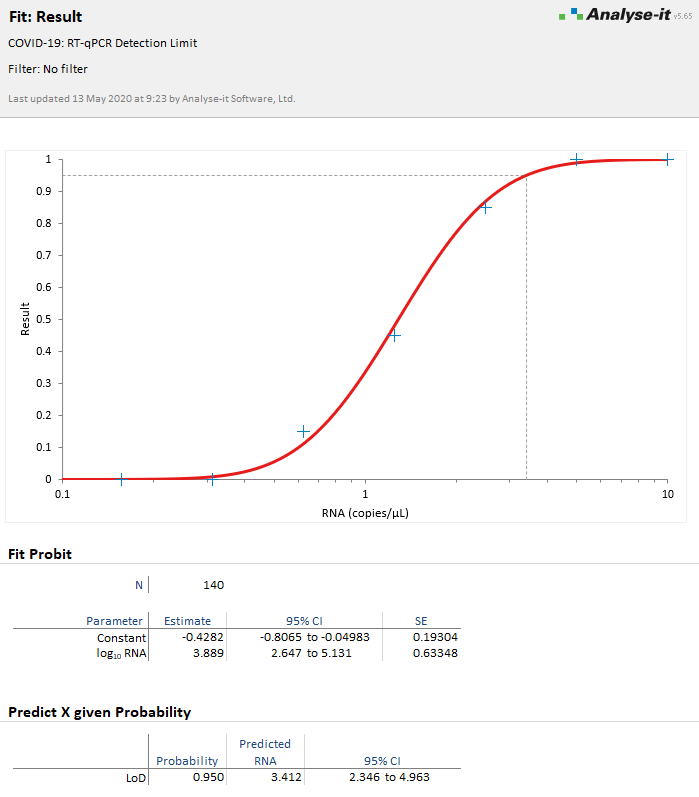
The Predict X for given Probability section shows the limit of detection (LoD) as the point where the probability of a positive result is 95%.
For more information, see the online documentation:
Estimating the detection limit using a probit fit
Get new posts by e-mail
Release news, how-tos and statistical explainers, one e-mail a post. Unsubscribe from any e-mail.